A backup you have never restored is a hope, not a backup. I wanted to know what happens to NKP when Prism Central disappears, so I deleted the AHV cluster that was running it.
In this article:
- What NKP does with no Prism Central, and a Prism Central recovery that failed.
- A brand-new Prism Central, and what registering the cluster to it did to the network.
- Keeping the existing NKP clusters and NDK on that new Prism Central, and proving they behave like freshly deployed ones.
Part 1: the crash and the recovery that failed
The lab
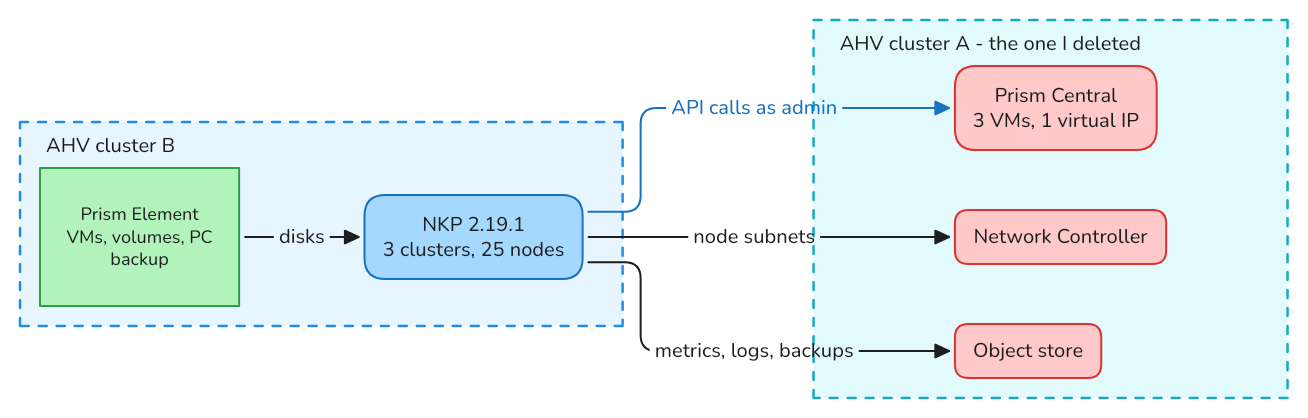
Two AHV clusters. Everything NKP depends on outside its own nodes sat on cluster A: Prism Central, the Network Controller that manages the node subnets, and the object store. NKP itself, its disks and the Prism Central backup were on cluster B.
| Item | Value |
|---|---|
| Prism Central | scale-out, 3 VMs, pc.7.6.0.6, one virtual IP |
| AHV cluster A | hosted Prism Central, the Flow Network Controller and Nutanix Objects. Deleted. |
| AHV cluster B | AOS 7.6.0.6, hosts every NKP node. Prism Central backup target. |
| NKP | 2.19.1, Kubernetes 1.36.2: management cluster (9 nodes), two workload clusters (4 and 12 nodes) |
| NKP node subnets | VLAN subnets managed by the Network Controller |
| NKP credentials for Prism Central | the admin user, everywhere |
The last two rows matter later.
With Prism Central gone, NKP keeps running
State captured a few hours after the deletion:
| Area | Observation |
|---|---|
| Nodes and workloads | every node Ready on the three clusters, no HelmRelease or Kustomization failing |
| Volumes | all PersistentVolumes Bound, pods keep their disks |
| Cluster API | quiet. CAPX makes no Prism Central call while nothing is created or deleted |
| Cloud controller manager | calls fail a few hours later, with no effect on running nodes |
| Konnector agent | the first component to log a failed Prism Central call |
| Object storage consumers | Thanos cannot reach its bucket: the object store was on the deleted cluster |
A running NKP cluster does not need Prism Central to keep running. What stops is everything that creates, deletes or looks up infrastructure: new nodes, node replacement, new volumes, upgrades.
The recovery
Prism Central was protected with the built-in backup to cluster B. The recovery is started from Prism Element on cluster B.
The short version: the VMs deploy, the data comes back, and the last step, the keys, fails.

| Time | Event |
|---|---|
| 08:29 | Recovery started. Four tasks appear on the Prism Element |
| 08:36 | The new Prism Central VMs answer ping |
| 08:53 | The API answers (401) |
| 09:26 | "Download and deploy" done: 56 min. The bundle was already on the Prism Element, so nothing was downloaded |
| 09:29 | The restore stops aplos and mercury on the Prism Central VMs |
| 09:40 | Services restarted |
| 09:46 | IAM data restored. One second later the key manager reports an error |
| 09:53 | Recovery failed. The Prism Central VMs are up, Prism Central is unusable |
Where to look while it runs:
| Where | What |
|---|---|
| Prism Element, task list | component PrismCentral-DR: recovery, validation wait, restore wait |
| Prism Central VM | ~/adonis/logs/prism-service.log: the Adonis service performs the restore, step by step |
| Prism Central VM | the Mantle logs: Mantle is the key manager |
The recovery wizard asks for no key. The backup password is read from the Mantle service of the Prism Element that holds the backup.
Why it failed
Everything before the key step succeeded: trust data, the IDF database, files, Zookeeper nodes, CA certificates, IAM. Then:
mantle_server_pcbr_manager.cc:575 Backup password checksum mismatch
Failed to Fetch MK Backups from IDF
PCBR_INTERNAL_SERVER_ERROR
What the restored data shows:
| Item | Value |
|---|---|
| Master-key backup in the restored database | one, version 2, dated 2026-10-28 |
| Backup password id that key backup references | id A |
| Backup password id handed out by the Prism Element | id B, a different one |
Two different ids: the password the Prism Element gives is not the one the key backup was sealed with.
I ran the recovery a second time the same afternoon. Deployment took 53 min, the restore step failed after 25 min, with the same message.
This lab has been through several Prism Central recovery exercises over the past months, and multiple crash tests for other projects. The backup I was relying on carried that history. I chose not to repair it and took the other road: a new Prism Central.
What to do on your side: a Prism Central backup is only proven by a recovery. Run one on purpose, on a day you choose, and check the Mantle log of the restored Prism Central for the line above.
And if it happens to you in production, contact Nutanix Support: they can assist you with a recovery in this state. For me this is a lab, and it was the opportunity to test something else: a fresh redeployment, because no documentation says existing NKP clusters can be attached to a new Prism Central.
A side effect: NKP locks the admin account
During the recovery, the freshly deployed Prism Central runs with default settings until the restore step replaces them. NKP does not know that and keeps calling with the stored admin password.
| Observation | Value |
|---|---|
| Failed logins | 7 to 12 per minute and per NKP cluster (cloud controller manager, CAPX) |
| Lockout policy on the Prism Central VM | 3 failures, locked for 900 s |
Time to lock admin |
6 seconds after the API services came back |
sudo faillock --user admin on the Prism Central VM lists three failed logins of type SVC: API logins count against the same lockout as console logins.
Two rules come out of this:
- Run NKP with a dedicated Prism Central user, never with
admin. Treat it as mandatory. Withadmin, every NKP cluster holds the key to the administrator's account and can lock it at the worst moment, which is exactly when Prism Central is being recovered. - Before a Prism Central recovery, scale down what calls it: the CAPX controller, the cloud controller managers and the Konnector agents.
Part 2: a new Prism Central
Two recoveries, two failures, and three NKP clusters still running with nobody to answer their API calls. The decision: deploy a new, empty Prism Central on the same address and attach everything to it, including three NKP clusters that were created under the old one. No procedure describes that for NKP.
What NKP needs from Prism Central
Read from the management cluster before starting:
| Dependency | How NKP references it | With a new Prism Central |
|---|---|---|
| Endpoint | IP and port, in the NutanixCluster and the credential secrets | same if the new one takes the same address |
| Credentials | user and password in secrets | same if that user exists with that password |
| AHV cluster | by name | same once the cluster is registered |
| Node image | by name | must be imported again |
| Node subnet | by name | must exist again under the same name |
| Node VMs | providerID: nutanix://<vm uuid> |
the uuid belongs to the Prism Element, unchanged |
| Volumes | NutanixVolumes-<volume group uuid> |
the uuid belongs to the Prism Element, unchanged |
On paper it fits: same address, same credentials, same names. Two things on this list cost us the evening, the subnet and the credentials.
The five steps of this part, with the one that hurt in red:

Step 1: clean up after the failed recoveries
Each failed recovery leaves powered-off Prism Central VMs on the cluster. Deploying a new Prism Central with the same address then fails with InUse: IP address ... is in use.
| Leftover | How to find it | How to remove it |
|---|---|---|
| Prism Central VMs of the failed attempts | acli vm.list |
acli vg.detach_from_vm for each attached volume group, then acli vm.delete |
| The address, still reserved on the subnet | acli net.list_ip_blacklist <subnet> |
acli net.delete_from_ip_blacklist <subnet> ip_list=<ip> |
The address answered no ping and no VM held it. Only the subnet's reserved list still had it.
Step 2: unregister the cluster from the lost Prism Central
The cluster still lists the deleted Prism Central as registered. Nutanix documents this case in KB 4944, scenario 2, on a CVM:
$ ncli multicluster get-cluster-state
$ ncli multicluster delete-cluster-state cluster-id=<lost-pc-uuid> skip_data_cleanup=false
Cluster state deleted successfully
$ python /home/nutanix/bin/unregistration_cleanup.py <lost-pc-uuid>
| Step | Duration | Result |
|---|---|---|
delete-cluster-state |
5 s | registered cluster count: 0 |
unregistration_cleanup.py |
3 min | both handlers report Success |
One thing to know before running the second command: on a Prism Element, the script ends by deleting the Prism Central backup stored there (about 130 000 entities here). After it, a recovery from that cluster is no longer possible. Run it when you have decided not to recover.
Before deploying: choose the address
The old Prism Central was scale-out: three VMs, each with its own address, behind one virtual IP. The new one is a single VM. We gave that VM the old virtual IP.
| Who talks to Prism Central | On which address | With a different address |
|---|---|---|
| NKP: CAPX, cloud controller manager, CSI, Konnector | the virtual IP, written in the NutanixCluster object and in every credential secret | every cluster must be reconfigured: endpoint in the cluster definition, the CSI secret (<ip>:9440:<user>:<password>), the cloud controller and Konnector settings |
| The AHV hosts, for the Network Controller | a name that Prism Central resolves for them | see Step 4: the name still pointed at the three old VM addresses |
Keeping the virtual IP is what let NKP reconnect with no change in Part 3. Choose it on purpose: with another address, add a reconfiguration of every cluster to this procedure.
Step 3: deploy the new Prism Central
Deployed from Prism Element: single VM, same version, on the old virtual IP.
| Time | Event |
|---|---|
| 19:03 | Deployment request |
| 19:09 | VM created |
| 19:11 | SSH answers |
| 19:53 | Prism Central up, all services running |
What a new Prism Central contains: nothing. No images, no categories, no directory and role mapping, no Network Controller, no object store, no protection policy. The directory and the role mapping are the first things to put back, so that people stop using admin too.
The admin lockout, again
The NKP clusters call the new Prism Central with the admin password of the old one.
| Observation | Value |
|---|---|
Failed admin logins on the Prism Central VM |
25 to 32 per minute |
| Unauthenticated API call | 401 in 0.1 s |
Any admin login: UI, API, ncli on the VM itself |
hangs, then times out |
The administrator cannot log in to change the password, because the login path is saturated by the wrong password. Once admin was set to the password NKP holds, the failed logins stopped within the minute and a login answered in 0.6 s.
This is the second time in one day that sharing admin between NKP and humans blocked us. A dedicated Prism Central user for NKP is mandatory: with one, the new Prism Central is usable from the first minute, the worst case is a locked service account, and that account is recreated when you are ready for NKP to reconnect.
Step 4: register the cluster, lose the network, repair it
The NKP node subnets were VLAN subnets managed by the Flow Network Controller. The controller lived with the old Prism Central. The Flow Virtual Networking Guide asks to disable the Network Controller for a cluster before unregistering it, from Prism Central. With Prism Central gone, that step is not available.
The cluster was registered to the new Prism Central at 19:56. The whole sequence, then each repair in order:
| Time | Event | Section |
|---|---|---|
| 19:56 | Cluster registered. On the four AHV hosts, ovn-controller is stopped and disabled; the cluster shows the Network Controller disabled |
|
| 19:57 | Every VM with a controller-managed NIC is cut off: 34 NICs, including the 25 NKP nodes. The VMs stay powered on | |
| 20:00 | Network Controller enabled on the new Prism Central. The hosts do not connect to it | 4.1 |
| 20:10 | Hosts connected. The VMs are still cut off: the new controller knows no subnet | 4.2 |
| 20:22 | Subnets recreated, first node answers on a recreated subnet | 4.2, 4.3 |
| 20:33 | NICs of every NKP node moved. Management cluster: 9 nodes Ready | 4.3 |
Until 19:56, between the deletion of the old Prism Central and this registration, the nodes had kept their network: the hosts were still applying the last flows they had received.
4.1 Enable the Network Controller, and get the hosts to reach it
A new Prism Central has no Network Controller. Enable it in Prism Central. The cluster then receives new controller settings:
acli atlas_config.get |
Under the old Prism Central | Under the new one |
|---|---|---|
enable_atlas_networking |
True |
False at registration, True once the controller is enabled |
anc_domain_name_server_list |
10.12.54.112 |
10.12.54.8 |
ovn_remote_address |
ssl:anc-ovn-external.ntnx-flow.flow.msp.cluster.local:6652 |
ssl:anc-ovn-external.default.msp.cluster.local:6652 |
The settings were right, the certificates were new, and the hosts still did not connect.
Diagnosis
On the new Prism Central, the controller is healthy and every host agent is down:
$ atlas_cli network_controller.get <uuid>        # on the Prism Central VM
      cluster_name: "<cluster>"
      connection_status: "kHealthy"
        service_list { name: "kControlPlaneAgent"  state: "kDown" }     # same for the four hosts
    service_list { name: "kConfigurationDatabase"  state: "kHealthy" }
    service_list { name: "kCoreService"            state: "kHealthy" }
On the hosts, the agent is running and not connected, and the controller name resolves to three addresses:
$ hostssh "ovn-appctl connection-status"         # on a CVM
not connected

$ hostssh "getent hosts anc-ovn-external.default.msp.cluster.local"
10.12.54.2      anc-ovn-external.default.msp.cluster.local
10.12.54.3      anc-ovn-external.default.msp.cluster.local
10.12.54.4      anc-ovn-external.default.msp.cluster.local
Those are the addresses of the three VMs of the old, scale-out Prism Central. They no longer exist. The new Prism Central is one VM, on 10.12.54.8. The agent log says the same thing in its own words:
reconnect|INFO|ssl:anc-ovn-external.default.msp.cluster.local:6652: connection attempt failed (No route to host)
Everything else was in place: the brAtlas bridge on every host, new certificates pushed when the controller was enabled, and a TLS handshake to 10.12.54.8:6652 with those certificates succeeds.
Fix
Point the name at the new Prism Central on each AHV host, then restart the agent:
$ hostssh 'echo "10.12.54.8 anc-ovn-external.default.msp.cluster.local" >> /etc/hosts'
$ hostssh "systemctl restart ovn-controller"
$ hostssh "ovn-appctl connection-status"
connected
The four hosts connected at 20:10.
| Point | Detail |
|---|---|
| Why it happened here | the previous Prism Central was scale-out, the new one is a single VM: three controller addresses became one, and it is a different one |
| What to check before | list the addresses of the old Prism Central VMs, not only its virtual IP. Anything that answers on them will not answer after |
| The hosts-file entry | a manual change on AHV. The Prism Central DNS answers 10.12.54.8 for that name, so the entry is a safety net to remove once the hosts resolve it by themselves |
4.2 Recreate the subnets
The hosts were now connected to a controller that knew none of the subnets. On the Prism Element, each NIC still referenced a subnet id that no longer existed anywhere:
$ acli vm.get <node-vm>
      network_name: ""
      network_type: "kAtlasNetwork"
      network_uuid: "1deced97-…"
Each subnet is recreated on the new Prism Central as a controller-managed VLAN subnet, with the same name, VLAN, gateway, DHCP settings and pools. The name matters: NKP machine templates look the subnet up by name.
$ curl -sk -u admin -X POST https://<pc>:9440/api/networking/v4.0/config/subnets \
    -H 'Content-Type: application/json' -H "NTNX-Request-Id: $(uuidgen)" -d @subnet.json
{
  "name": "nkp-vlan72-workloads",
  "subnetType": "VLAN",
  "networkId": 72,
  "isAdvancedNetworking": true,
  "isExternal": false,
  "clusterReference": "<cluster-uuid>",
  "virtualSwitchReference": "<virtual-switch-uuid>",
  "dhcpOptions": { "domainNameServers": [{ "ipv4": { "value": "10.12.54.14" } }], "domainName": "example.local" },
  "ipConfig": [{ "ipv4": {
    "ipSubnet": { "ip": { "value": "10.12.72.0" }, "prefixLength": 24 },
    "defaultGatewayIp": { "value": "10.12.72.1" },
    "dhcpServerAddress": { "value": "10.12.72.254" },
    "poolList": [{ "startIp": { "value": "10.12.72.50" }, "endIp": { "value": "10.12.72.69" } }]
  } }]
}
The subnet gets a new id. The NICs do not follow.
4.3 Move each NIC, without rebooting the VM
Three commands per VM, on a CVM:
$ acli vm.nic_update <vm> mac_addr=<mac> network=<any-basic-subnet> request_ip=false
$ acli vm.nic_update <vm> mac_addr=<mac> network=<new-subnet-uuid> ip=<same-ip>
$ acli vm.migrate <vm> host=<another-host>
| Step | Why |
|---|---|
| Temporary move to a basic subnet | a direct move to the new subnet is refused: VmNicInUseError: MAC address ... in use |
| Move to the new subnet with the same MAC and IP | the guest keeps its address, nothing changes inside the VM |
| Live migration | the running VM stays wired to its old port until it lands on another host |
Give vm.migrate an explicit host. We ran it without one at first: the three control-plane VMs of a cluster ended up on the same host, and had to be spread again. Whatever kept them apart before was a policy in the old Prism Central.
| Time | Result |
|---|---|
| 20:22 | First node answers on a recreated subnet |
| 20:25 to 20:32 | 29 VMs moved, three at a time, no error |
| 20:33 | Management cluster: 9 nodes Ready |
The nodes were unreachable for 25 to 35 minutes in total, from the registration to their NIC move. No VM was rebooted, and the nodes rejoined their clusters on their own once they could talk again.
A basic VLAN subnet with the same name works too, with the same three steps, and removes the dependency on Prism Central for the node network. We kept controller-managed subnets to stay identical to the previous setup.
Step 5: import the node image
The new Prism Central has no image. The Prism Element still has all of them. Import the NKP node image into the new Prism Central under the exact name the machine templates use. Until then, no node can be created or replaced.
Part 3: NKP and NDK on the new Prism Central
Everything is green, and the first node that restarts will lose its storage. Three NKP 2.19.1 clusters created under a Prism Central that no longer exists are now facing a new, empty one on the same address. The product documents recovering Prism Central, not replacing it under running clusters. This section shows that it can be done, how, and how the result compares with a cluster deployed fresh.
What reconnects by itself
Same address, same credentials. No secret or manifest was changed.
| Component | Result |
|---|---|
| CAPX | PrismClientInit=True on the three clusters as soon as the credentials were accepted |
| Cloud controller manager | client initialized; it rewrote its node label nutanix.com/prism-central-uuid to the new id |
| CSI controller | running, calls answered |
| Konnector agent | the three clusters show as Connected in the new Prism Central |
| Running pods and their volumes | not affected |
| Removing a node | pool scaled from 7 to 6: drain, VM deleted through the new Prism Central, done in 68 s |
| Creating a node | works once the node image is imported. CAPX recreates its KubernetesClusterName category |
At that point everything looks fine. It is not.
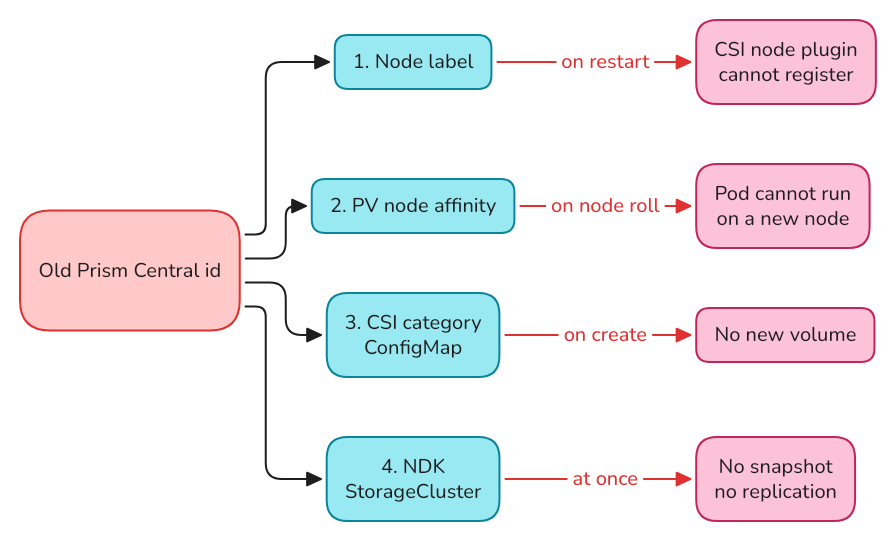
The old Prism Central id is stored in four places
| # | Where | Object | What breaks |
|---|---|---|---|
| 1 | Node label | csi.nutanix.com/prism-central-uuid |
a CSI node plugin that restarts can no longer register |
| 2 | Volume | PersistentVolume.spec.nodeAffinity |
a pod with an existing volume cannot run on a new node |
| 3 | CSI category | ConfigMap ntnx-system/nutanix-csi-category-id |
no new volume can be created |
| 4 | NDK | StorageCluster.spec.managementServerUuid |
no snapshot, no replication |
None of them shows until something restarts, is created or is replaced.
1. The node label
The CSI node plugin labels each node with the Prism Central id. After a restart it reports the new id, and the kubelet refuses the change:
RegisterPlugin error -- plugin registration failed with err: error updating Node object with CSI driver node info: (...)
detected topology value collision: driver reported "csi.nutanix.com/prism-central-uuid":"8767e286-…"
but existing label is "csi.nutanix.com/prism-central-uuid":"36feb6ab-…"
The driver-registrar container goes into CrashLoopBackOff and that node can no longer mount volumes. Three nodes were already in that state when we looked.
A temporary fix keeps the clusters stable while the rest is prepared. The CSI guide ("Storage Topology") describes node annotations that the driver reads instead of asking Prism Central:
$ kubectl annotate node --all \
    csi.nutanix.com/prism-central-uuid=<old-pc-uuid> \
    csi.nutanix.com/prism-element-uuid=<pe-uuid>
$ kubectl -n ntnx-system delete pod <failing-nutanix-csi-node-pod>
The new pod was 3/3 Running in 30 seconds. This holds the old id in place on purpose. It is removed again below.
2. The volume node affinity
Every Nutanix Volumes PV requires a node carrying the old id:
nodeAffinity:
  required:
    nodeSelectorTerms:
      - matchExpressions:
          - { key: csi.nutanix.com/prism-element-uuid, operator: In, values: ["<pe-uuid>"] }
          - { key: csi.nutanix.com/prism-central-uuid, operator: In, values: ["<old-pc-uuid>"] }
A node created after the switch carries the new id. A pod with an existing volume, pinned to such a node:
0/4 nodes are available: 1 node(s) didn't match PersistentVolume's node affinity, ...
So a node roll or an upgrade, done as is, strands every stateful pod.
The field cannot be edited: Kubernetes 1.36 rejects the patch, and the MutablePVNodeAffinity feature gate is alpha and off. The PV object can be re-created instead. The volume group on the Prism Element is never touched, and the pod using the volume keeps running.
$ kubectl get pv <pv> -o json > pv.before.json

$ jq --argjson w '["<old-pc-uuid>","<new-pc-uuid>"]' '
    del(.metadata.uid, .metadata.resourceVersion, .metadata.creationTimestamp,
        .metadata.managedFields, .metadata.generation, .status)
    | .spec.persistentVolumeReclaimPolicy = "Retain"
    | .spec.nodeAffinity.required.nodeSelectorTerms |= map(.matchExpressions |= map(
        if .key == "csi.nutanix.com/prism-central-uuid" then .values = $w else . end))
  ' pv.before.json > pv.new.json

$ kubectl patch pv <pv> --type=merge -p '{"spec":{"persistentVolumeReclaimPolicy":"Retain"}}'
$ kubectl get pv <pv> -o jsonpath='{.spec.persistentVolumeReclaimPolicy}'    # must print Retain
$ kubectl delete pv <pv> --wait=false
$ kubectl patch pv <pv> --type=merge -p '{"metadata":{"finalizers":null}}'
$ kubectl create -f pv.new.json
$ kubectl patch pv <pv> --type=merge -p '{"spec":{"persistentVolumeReclaimPolicy":"Delete"}}'   # the original policy
| Point | Detail |
|---|---|
Retain first, and checked |
with Delete, removing the PV object would delete the volume group. Do not continue if the check does not print Retain |
claimRef kept, including its uid |
the claim binds again to the same PV, about 10 s later |
| Both ids accepted | pods can run on old and new nodes during the roll |
ClaimLost warning event |
appears on the claim between the delete and the create. The claim is Bound again right after |
| File-share volumes | carry no Prism Central affinity, nothing to do |
About 15 seconds per volume. 72 volumes across the three clusters, no pod restarted. A file written before the operation was read back after it and after the full node roll.
3. The CSI category
The first new volume failed, and the same stale id was in the ConfigMap of the three clusters:
NutanixVolumes: error associating category: KubernetesClusterUUID/k8s-<cluster-uuid> to volume,
err: VG (...) category association failed with status: 404 NOT FOUND ... Invalid category [153b8577-…]
The CSI driver tags each volume group with a category that identifies the Kubernetes cluster. It created that category once, at installation, and keeps its id in a ConfigMap:
$ kubectl -n ntnx-system get cm nutanix-csi-category-id -o jsonpath='{.data.categories}'
KubernetesClusterUUID/k8s-5100d2ce-…;153b8577-…
The new Prism Central has no such category. Create it with the same key and value, then put its new id in the ConfigMap:
$ curl -sk -u admin -X POST https://<pc>:9440/api/prism/v4.0/config/categories \
    -H 'Content-Type: application/json' -H "NTNX-Request-Id: $(uuidgen)" \
    -d '{"key":"KubernetesClusterUUID","value":"k8s-<cluster-uuid>"}'

$ kubectl -n ntnx-system create configmap nutanix-csi-category-id \
    --from-literal=categories='KubernetesClusterUUID/k8s-<cluster-uuid>;<new-category-id>' \
    --dry-run=client -o yaml | kubectl apply -f -
$ kubectl -n ntnx-system rollout restart deploy/nutanix-csi-controller
Update the ConfigMap in place. The controller does not recreate it and does not start without it.
The same category can then be associated with the existing volume groups (POST /api/volumes/v4.0/config/volume-groups/<id>/$actions/associate-category), so old and new volumes look the same in Prism Central.
4. The NDK StorageCluster
$ kubectl get storagecluster -o jsonpath='{.items[0].status}'
{"available":false,"message":"unable to find server with provided ManagementServerUuid","reason":"NotFound"}
The spec is immutable. The object has no finalizer and nothing refers to it by anything but its name, so it is deleted and created again with the new id:
apiVersion: dataservices.nutanix.com/v1alpha1
kind: StorageCluster
metadata:
  name: <same-name>
spec:
  storageServerUuid: <pe-uuid>
  managementServerUuid: <new-pc-uuid>
Available 45 seconds later on both clusters. The replication remote and target became available again without any other action. Until then NDK looked installed and idle: the scheduled snapshot of the day of the switch was created and never became ready.
The order that worked
Per cluster, as run on the two workload clusters:

| Step | Action |
|---|---|
| 1 | Node annotations with the old id, so nothing else breaks meanwhile |
| 2 | CSI category recreated, ConfigMap updated |
| 3 | Every PV re-created to accept both ids |
| 4 | Node annotations removed |
| 5 | Rolling re-create of the workers, then of the control plane |
| 6 | Every PV re-created once more, new id only |
| 7 | NDK StorageCluster recreated |
The roll is a plain Cluster API rollout. Nothing in it is specific to this situation:
$ kubectl -n <ns> patch machinedeployment <md> --type=merge \
    -p "{\"spec\":{\"rollout\":{\"after\":\"$(date -u +%Y-%m-%dT%H:%M:%SZ)\"}}}"
$ kubectl -n <ns> patch kubeadmcontrolplane <kcp> --type=merge \
    -p "{\"spec\":{\"rollout\":{\"after\":\"$(date -u +%Y-%m-%dT%H:%M:%SZ)\"}}}"
| Cluster | Nodes | Workers | Control plane |
|---|---|---|---|
| Workload cluster 1 | 1 + 3 | 5 min 29 s | one node |
| Workload cluster 2 | 3 + 8 | 16 min | 9 min |
| Management cluster | 3 + 6 | 48 min | 14 min |
The management workers took longer because each new node starts with an empty image cache and that cluster runs about 400 pods.
Every new node registered with the new id, with no annotation and no manual step.
Compared with a freshly deployed cluster
A fourth cluster was created on the new Prism Central from the same definition as workload cluster 1: same cluster class, image, subnet and sizes. It was ready in 2 min 30 s, and a new volume was mounted 26 seconds after the claim.
Then the same facts were read from each cluster:
| Fact | Reattached clusters | Fresh cluster |
|---|---|---|
Node label csi.nutanix.com/prism-central-uuid |
new id | new id |
Node label nutanix.com/prism-central-uuid |
new id | new id |
| CSI node annotations | none | none |
| CSI driver registered | on every node | on every node |
| CSINode topology keys | Prism Central + Prism Element | Prism Central + Prism Element |
| PV node affinity | new id + Prism Element id | new id + Prism Element id |
| PV finalizers | pv-protection, attacher, provisioner | same |
| CSI category ConfigMap | KubernetesClusterUUID/k8s-<uuid>;<id> |
same format |
| Node VM category in Prism Central | KubernetesClusterName=<cluster> |
same |
| Provider id | nutanix://<vm uuid> |
same |
What differs is specific to each cluster: the number of nodes and the storage class options chosen when it was created.
Does it work?
On a reattached workload cluster:
| Test | Result |
|---|---|
| New volume | bound and mounted within seconds |
| Volume snapshot | ready in 6 s |
| Expansion from 1 to 2 GiB | done in 50 s, filesystem grown online |
| All volumes present, three clusters | 72 of 72 volume groups still on the Prism Element, every claim Bound |
With NDK 2.3, between the management cluster and a workload cluster:
| Test | Result |
|---|---|
| New application snapshot | ready in about 35 s |
| Restore from a snapshot taken on 1 October, under the old Prism Central | done in under a minute. The application's log ends 39 seconds before the snapshot time, then resumes |
| Restore from a snapshot taken on the new Prism Central | done in under a minute, 509 108 lines back |
| Replication to the second cluster | 80 s after the snapshot was ready |
| Restore of the replicated snapshot on the second cluster | volume and Deployment restored, 493 170 lines present |
Snapshots taken under the old Prism Central stay usable: they live on the Prism Element.
Before and after
| Before the crash | Now | |
|---|---|---|
| Prism Central | scale-out, 3 VMs | new, single VM, same address and version |
| NKP clusters | 3 | the same 3, every node re-created |
| Kubernetes objects carrying the old id | all nodes, all volumes | none |
| Volumes | 72 | the same 72 |
| NKP credentials | admin |
admin. A dedicated user is the first change to make |
| Node subnets | controller-managed VLAN | recreated, same names, new ids |
| Recreated by hand in Prism Central | subnets, node image, CSI categories, directory and role mapping | |
| Gone with the old Prism Central | everything else it held: other categories, policies, and in our case the object store that ran next to it |
The whole thing in one table
| Phase | Step | Duration here | Trap |
|---|---|---|---|
| Crash | NKP without Prism Central | hours, no impact on running workloads | node lifecycle and new volumes stop |
| Recovery | Prism Central recovery from backup | 56 min deploy, then failed | key backup mismatch; NKP locks admin |
| New Prism Central | Clean up failed recoveries | minutes | the address stays reserved on the subnet |
| Unregister from the lost Prism Central | 3 min | the cleanup deletes the Prism Central backup | |
| Deploy | 50 min | NKP locks admin until the password matches |
|
| Register the cluster | immediate | controller-managed subnets lose their network | |
| Enable the Network Controller, connect the hosts | 14 min | the controller name resolved to the old Prism Central VM addresses | |
| Recreate subnets, move NICs | 22 min for 30 VMs | new subnet id, NICs moved one by one | |
| Import the node image | depends on its size | name must match the templates | |
| NKP | CSI category, PV re-creation | 15 s per volume | reclaim policy must be Retain first |
| Rolling re-create of every node | 5 to 48 min for the workers of a cluster | none once the volumes accept the new id | |
| NDK | Recreate the StorageCluster | 45 s | the spec is immutable |
Summary
- Replacing Prism Central under running NKP clusters is possible without rebuilding them and without losing a volume.
- The old Prism Central id is stored in the node labels, the PVs, a CSI ConfigMap and the NDK StorageCluster. Each has its own fix.
- Re-creating a PV object changes its node affinity with the pod running.
- Once the volumes accept the new id, a node roll is an ordinary one, and the clusters match a fresh deployment.
- The cheap part to get right beforehand: test the Prism Central recovery, and give NKP its own account.
Prism Central was deleted, its recovery failed, and it was replaced by an empty one. The NKP clusters were never rebuilt, kept every volume, and now match a cluster deployed yesterday on everything that depends on Prism Central. Test your recovery before you need it. And if it fails anyway, you are not rebuilding your clusters.