Version note
This article was written for NKP 2.17. The current release is 2.18. See the Upgrade to NKP 2.18 series for the latest guidance.
Running Kubernetes in production is hard. Running it at scale, across multiple environments, while keeping up with EU regulations like NIS2 and DORA? That's a different challenge entirely.
This is Part 1 of a series where we go from zero to a fully operational NKP environment. We'll cover the architecture, the key concepts, and what makes NKP stand out from vanilla Kubernetes or platforms like OpenShift and Rancher.
What Is NKP?
NKP is a Kubernetes management platform built on pure upstream, CNCF-conformant Kubernetes. It's not a fork. It's standard K8s with a curated stack of services on top that handle the hard parts of running clusters in production.
The platform came out of Nutanix's acquisition of D2iQ (formerly Mesosphere) in 2023. It brings together two main components:
- Konvoy: the Kubernetes distribution itself, shipping with CIS-hardened node images
- Kommander: the management layer that provides the UI, GitOps, multi-tenancy, observability, and an application catalog
Together, they cover the full lifecycle: deploying clusters (Day 0), configuring them (Day 1), and operating them long-term (Day 2).
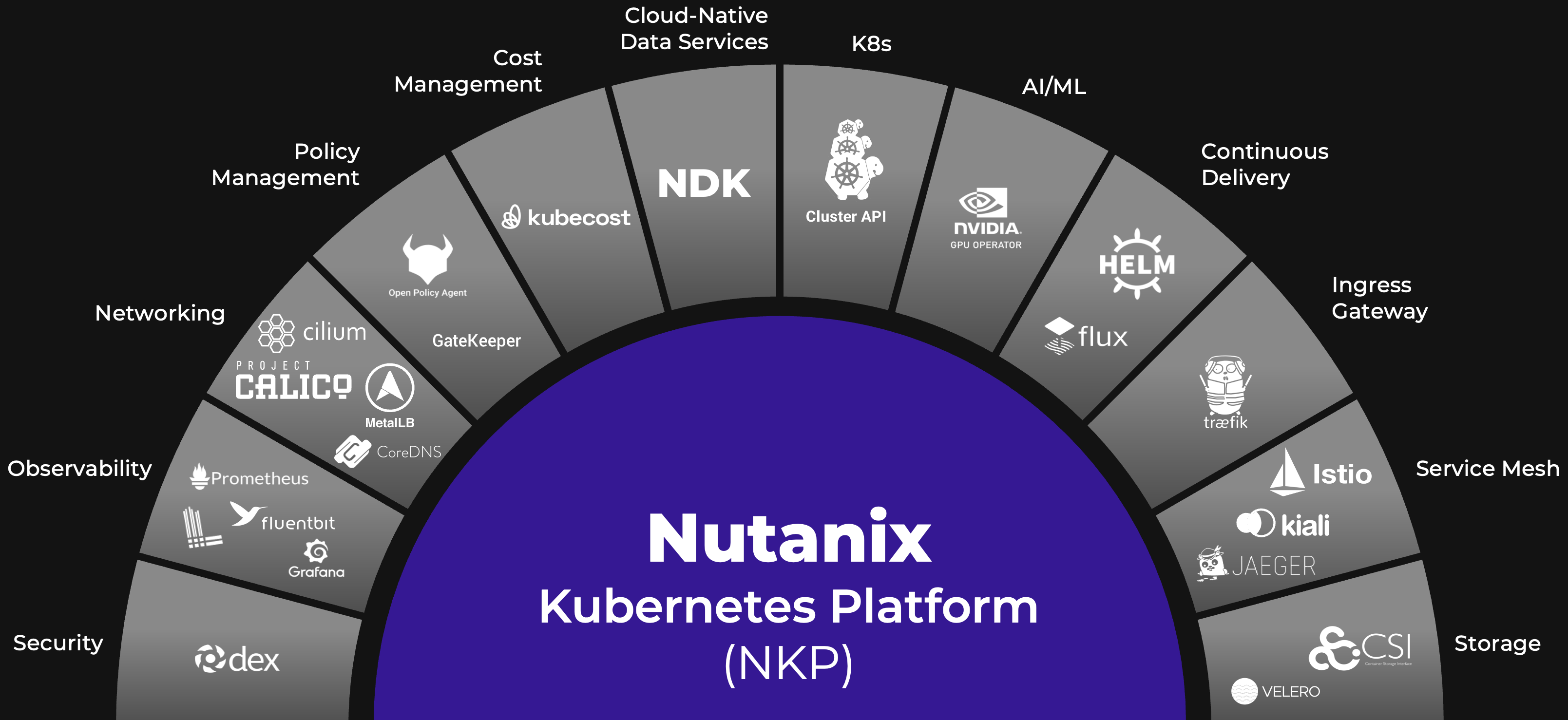
The diagram above gives you a sense of the breadth. Instead of gluing all these tools together yourself, NKP ships them pre-configured and lifecycle-managed. Cilium for networking, Prometheus and Grafana for monitoring, Velero for backups, Dex for authentication... it's all there, ready to go.
Architecture Overview
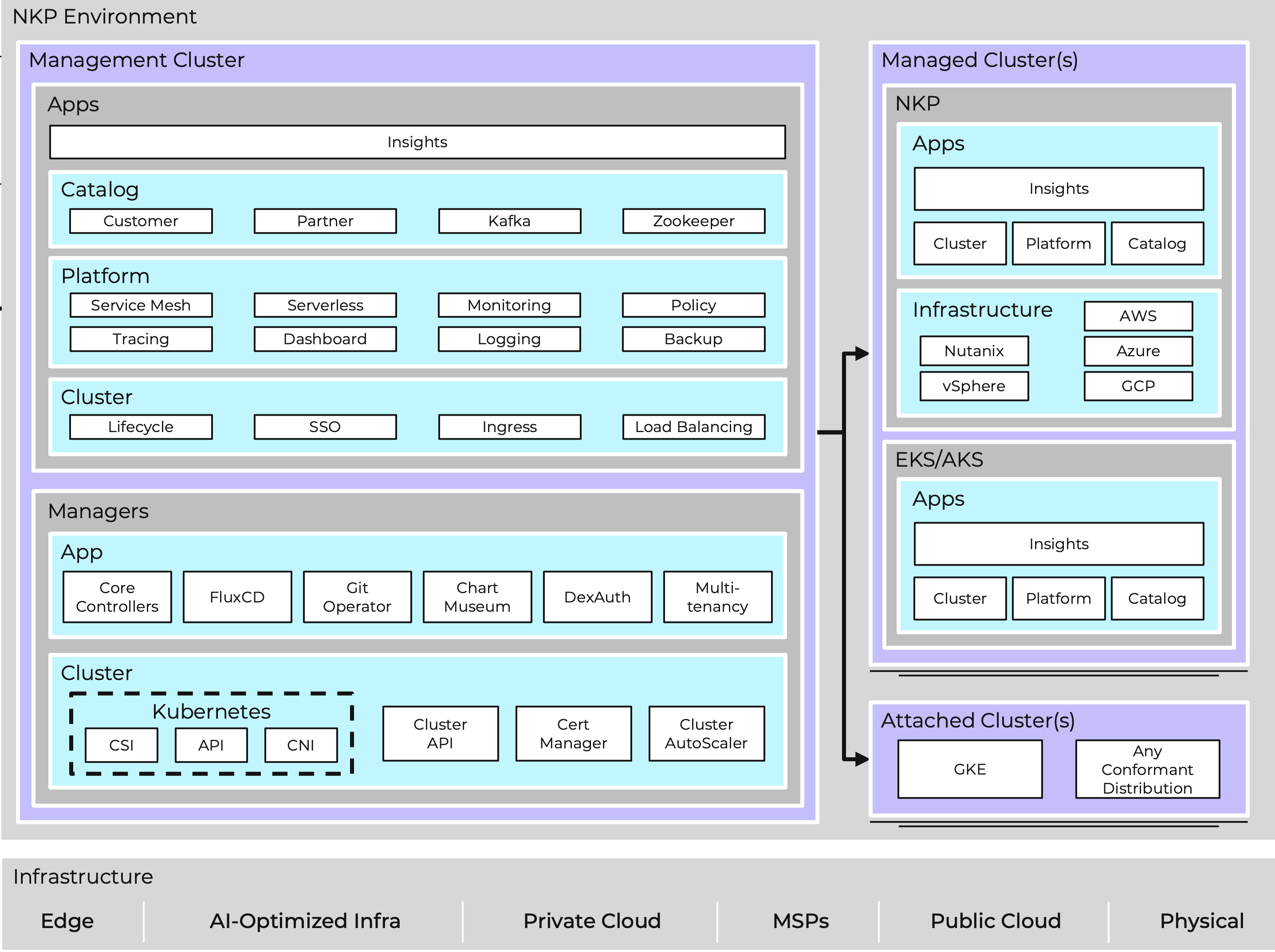
NKP uses a hub-and-spoke model. At the center sits a management cluster that takes care of everything else.
The Management Cluster
Think of the management cluster as the control tower. It's a self-managed Kubernetes cluster that runs all the platform controllers and services:
| Layer | What's in it | What it does |
|---|---|---|
| Cluster | Cluster API (CAPI), cert-manager, CNI, CSI | Handles infrastructure lifecycle |
| Managers | Flux CD, Git Operator, DexAuth | Orchestrates the platform |
| Platform | Prometheus, Loki, Grafana, Velero, Gatekeeper | Runs operational services |
| Catalog | Customer apps, Partner apps | Application marketplace |
| Apps | NKP Insights | Security scanning and diagnostics |
Important
The management cluster is not where you run your application workloads. It exists only to manage other clusters. This separation keeps your management plane from competing for resources with production apps.
Tip
For smaller deployments or lab environments, NKP also supports a standalone design where a single cluster acts as both management and workload cluster. This is a great way to get started without dedicating separate infrastructure to the management plane.
Cluster API (CAPI): What Makes It Work
Under the hood, NKP relies on the Kubernetes Cluster API to manage cluster lifecycles. CAPI lets you define clusters as Kubernetes resources in YAML. You apply them, and controllers handle the rest.
On Nutanix infrastructure, CAPI talks to Prism Central through CAPX (the Cluster API Provider for Nutanix). CAPX handles the infrastructure side: creating VMs, setting up networking, and attaching storage. On top of that, CAREN (Cluster API Runtime Extension for Nutanix) adds Nutanix-specific logic like OS image selection and cluster configuration defaults.
Once your management cluster is running, you can verify both controllers are healthy:
# Check the CAPX infrastructure provider
kubectl get pods -n capx-system

# Check the CAREN runtime extensions
kubectl get pods -n caren-system
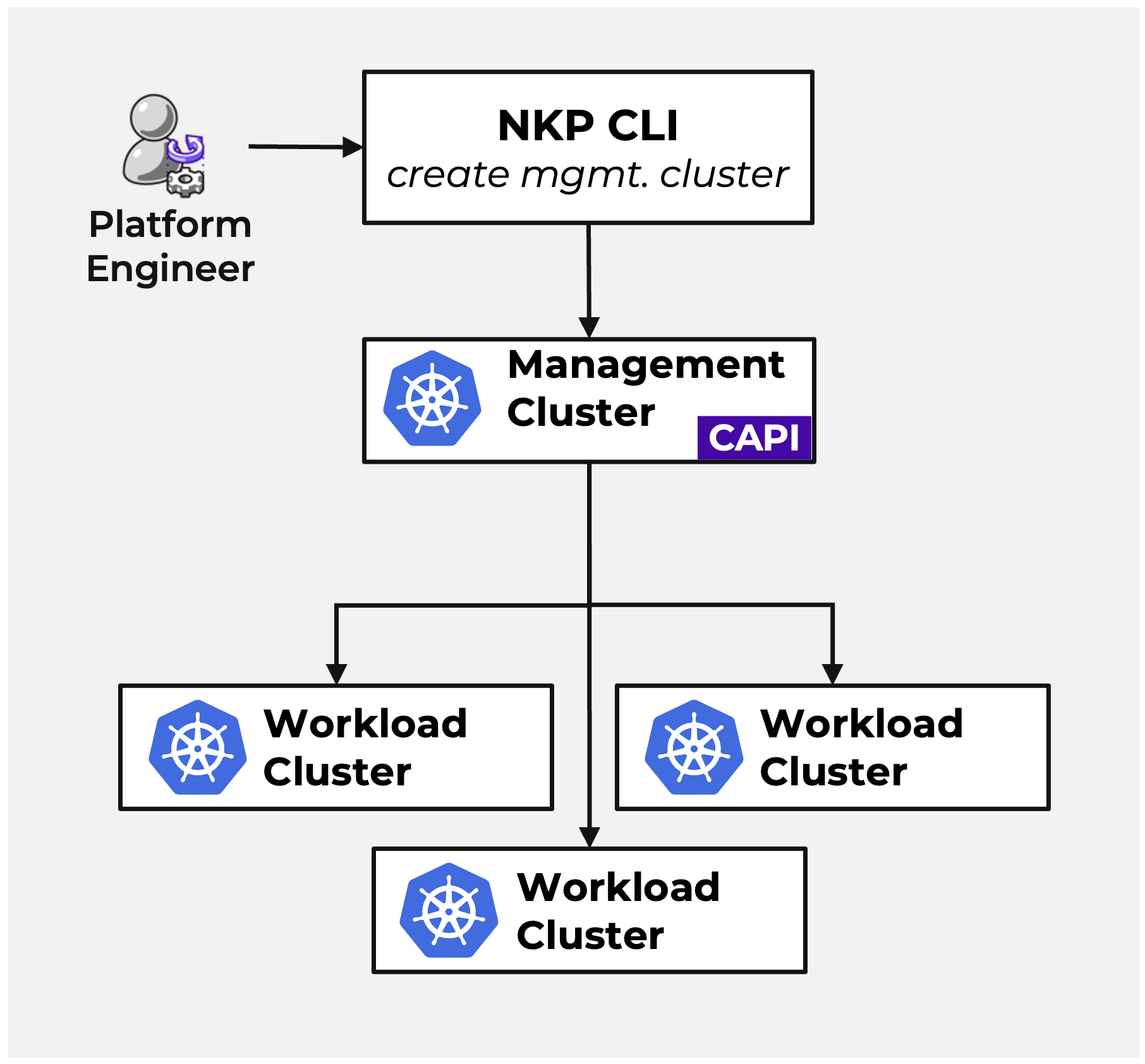
Here's how the bootstrap process works in practice:
- You run the
nkpCLI on a jump host. It spins up a temporary KinD (Kubernetes in Docker) cluster - This bootstrap cluster runs CAPI controllers that create the management cluster VMs on Nutanix AHV
- Once the management cluster is up, the CAPI controllers pivot over to it
- The bootstrap cluster gets deleted. The management cluster is now self-managing
- From this point on, it creates and manages all your workload clusters
Tip
If something goes wrong during bootstrap, you can inspect the temporary KinD cluster logs before it gets cleaned up:
docker logs konvoy-capi-bootstrapper-control-plane
Three Types of Clusters
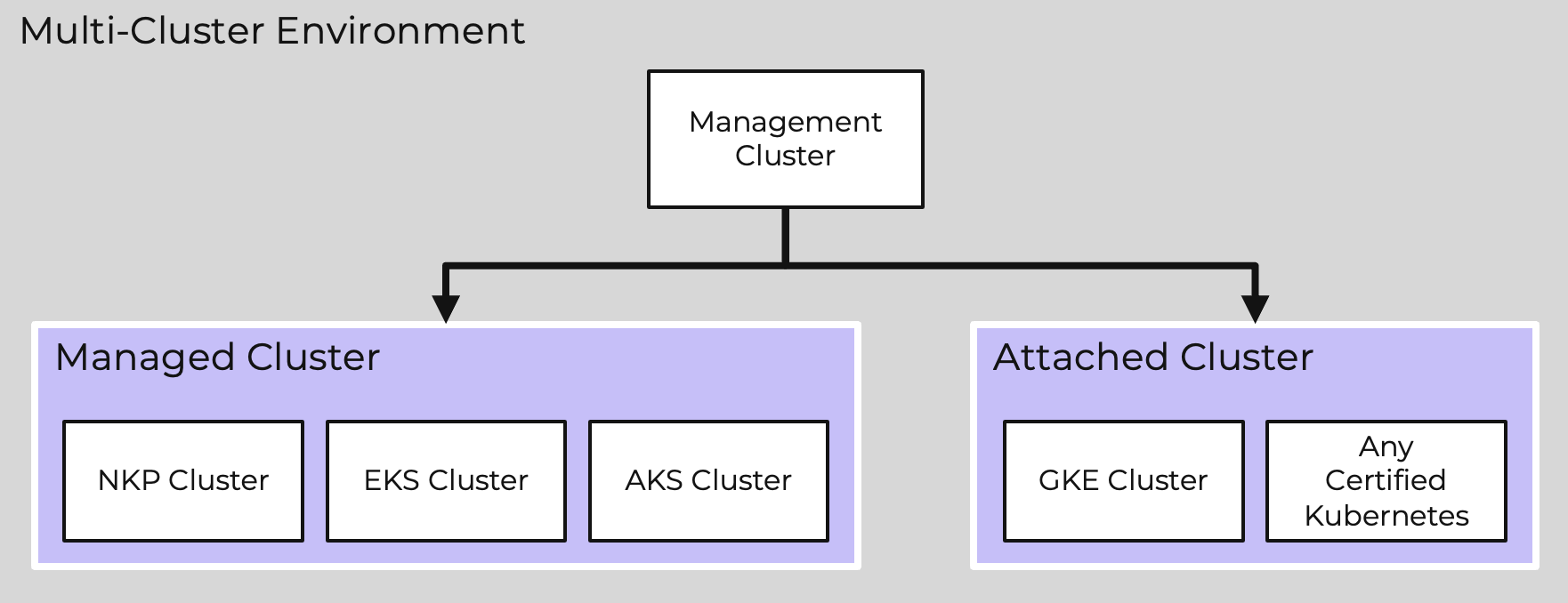
NKP works with three cluster types, each with a different purpose.
| Type | Who creates it | What NKP does with it | When to use it |
|---|---|---|---|
| Management | nkp CLI (bootstrap) |
Self-manages | Your single platform control plane |
| Managed | Management cluster via CAPI | Full lifecycle: create, scale, upgrade, delete | Production and dev workloads |
| Attached | You, with any tool (EKS, AKS, kubeadm...) | Monitoring and policy only | Existing clusters you want visibility into (Ultimate only) |
Managed clusters get the full treatment. NKP controls their lifecycle through CAPI, deploys platform services like monitoring and logging, and enforces your policies.
Attached clusters are different. These are Kubernetes clusters you already run somewhere else (could be EKS, GKE, or a plain kubeadm setup). You connect them to NKP so you can see them in the same dashboard and apply the same governance rules. NKP doesn't touch their infrastructure.
Lifecycle Management
Creating, scaling, upgrading, and deleting clusters are all done through YAML or the CLI. No clicking through wizards, everything is scriptable and repeatable.
Creating a Cluster
You define a workload cluster using a ClusterClass topology. Here's a simplified example:
apiVersion: cluster.x-k8s.io/v1beta1
kind: Cluster
metadata:
  name: production-wkl-01
  namespace: production-workspace
spec:
  clusterNetwork:
    pods:
      cidrBlocks: ["192.168.0.0/16"]
    services:
      cidrBlocks: ["10.96.0.0/12"]
  topology:
    class: nkp-nutanix-v2.17.1
    version: v1.34.3
    controlPlane:
      replicas: 3
    workers:
      machineDeployments:
        - class: default-worker
          name: md-general
          replicas: 3
Apply it with kubectl apply and CAPI takes it from there. It creates the VMs on AHV, bootstraps the OS, runs kubeadm, deploys the CNI and CSI drivers, and rolls out all your platform services.
Scaling
Want more nodes? The nkp CLI handles it:
nkp scale nodepools md-general \
  --cluster-name=production-wkl-01 \
  --replicas=5
You can also set up autoscaling with annotations on your MachineDeployment:
metadata:
  annotations:
    cluster.x-k8s.io/cluster-api-autoscaler-node-group-min-size: "3"
    cluster.x-k8s.io/cluster-api-autoscaler-node-group-max-size: "10"
Note
These annotations only work if the Cluster Autoscaler platform service is enabled via Kommander. Without it, CAPI won't act on the min/max values.
Upgrading
Kubernetes version upgrades are rolling. You point to a new node image that contains the target K8s version, and CAPI replaces nodes one at a time (or in batches if you prefer):
nkp upgrade cluster nutanix \
  --cluster-name production-wkl-01 \
  --vm-image nkp-rocky-9.7-release-cis-1.34.3-20260504011927.qcow2
No downtime. Workloads get drained and rescheduled as each node is replaced. The node images are built with NIB (Nutanix Image Builder, which replaced the older KIB in NKP 2.17+) and contain a specific Kubernetes version, OS patches, and CIS hardening.
Fleet Management and Multi-Tenancy
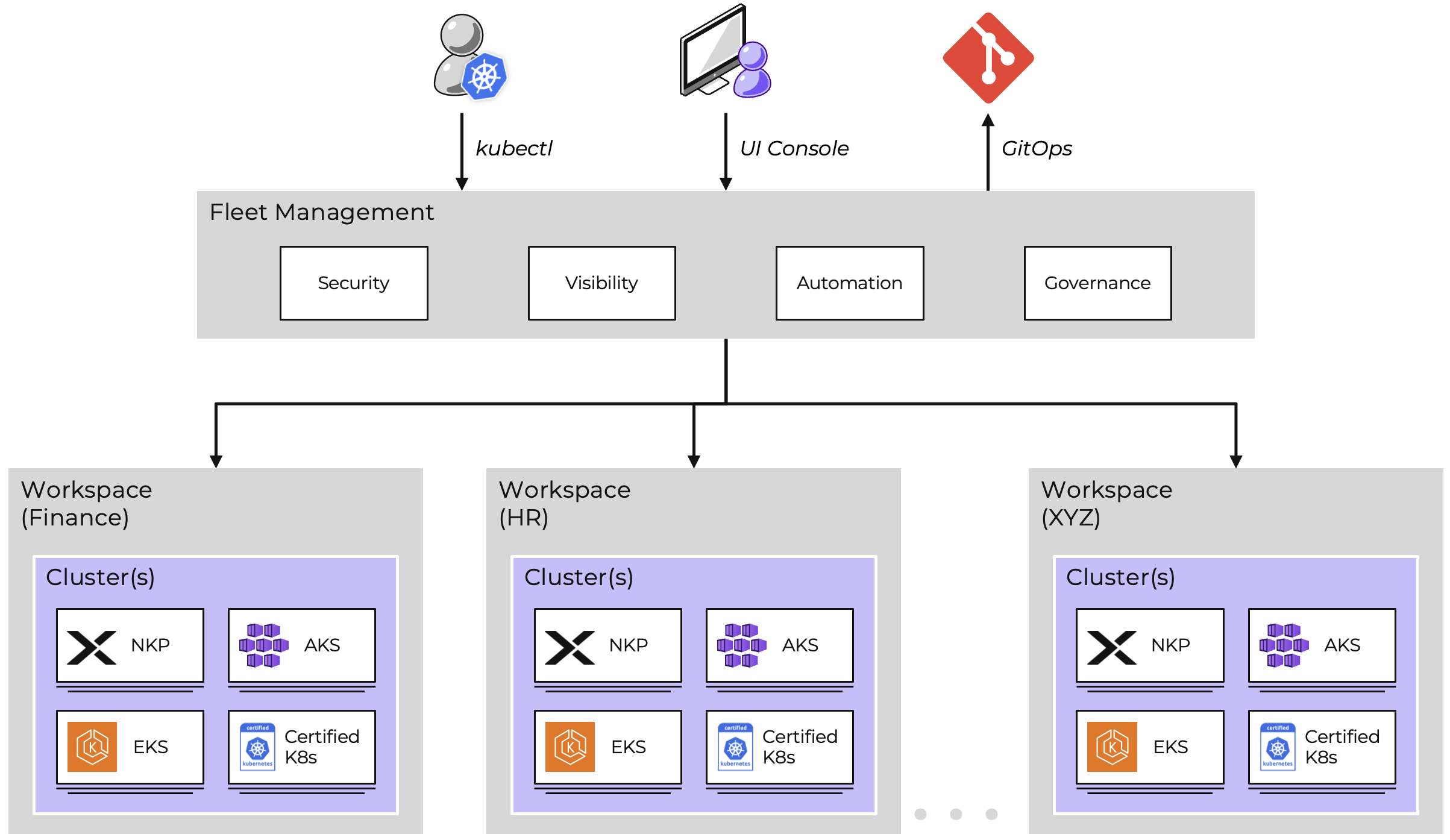
When you have multiple teams sharing the platform, you need proper isolation. NKP handles this with a hierarchy of workspaces and projects.
Workspaces
Workspaces are the top-level boundary. They usually map to teams or environments:
productionfor live workloads with strict access controlsstagingfor pre-production testingdevelopmentfor developer sandboxes
Each workspace gets its own namespace on the management cluster, its own RBAC policies, and can contain multiple clusters.
Projects
Projects sit inside workspaces. They give you namespace-level isolation within your workload clusters. This is where you scope your actual applications.
RBAC
NKP uses a 3-layer RBAC model:
| Layer | What it covers | Example |
|---|---|---|
| Cluster | Entire management cluster | Platform admins |
| Workspace | All clusters in a workspace | Team leads |
| Project | Specific namespace in specific clusters | Developers, CI/CD pipelines |
Tip
We typically connect RBAC to Active Directory groups through Dex OIDC connectors. That way, access follows your existing identity setup. No need to manage users separately in Kubernetes.
Hybrid and Multi-Cloud
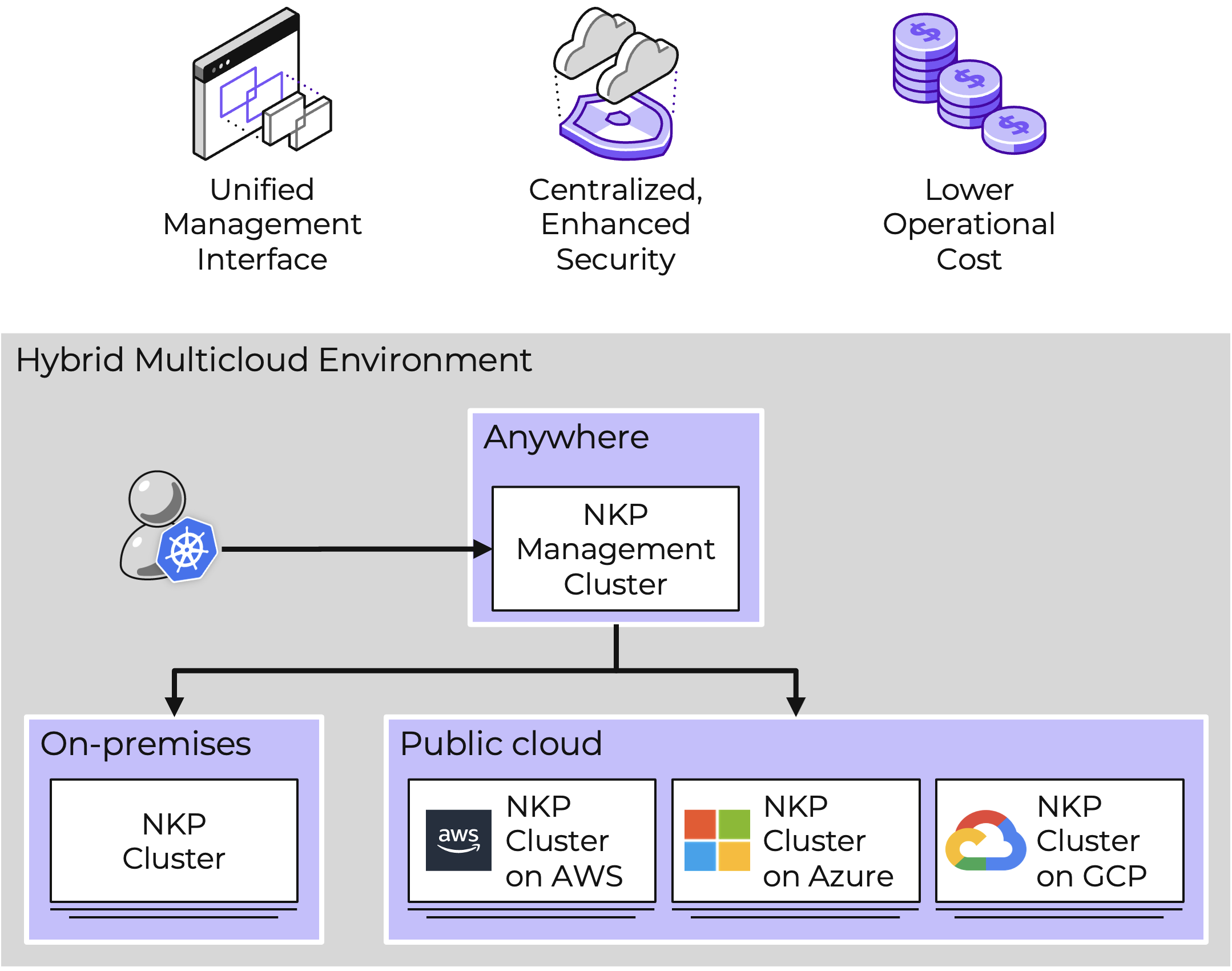
NKP isn't locked to Nutanix AHV. You can manage workload clusters across several infrastructure providers from the same management cluster.
| Provider | How | Typical use case |
|---|---|---|
| Nutanix AHV | Native CAPX provider | On-prem, primary infrastructure |
| VMware vSphere | CAPV provider | Migration path from VMware |
| AWS | CAPA provider or NC2 | Cloud burst, hybrid workloads |
| Azure | CAPZ provider or NC2 | Hybrid cloud |
| GCP | CAPG provider | Multi-cloud strategy |
| Bare Metal | Pre-provisioned | Edge locations, ROBO sites |
Note
Running NKP on non-AHV providers (vSphere, AWS, Azure, etc.) requires an NKP Pro or Ultimate license. The Starter tier only covers Nutanix AHV with Rocky Linux.
The workflow stays the same regardless of provider. A cluster on AWS and a cluster on AHV look identical from a management perspective. Same monitoring, same policies, same GitOps pipeline.
Air-Gapped Deployment
For regulated industries like banking, government, or healthcare, internet access might not be available. Or it might not be acceptable from a security standpoint. NKP fully supports air-gapped (disconnected) deployments.
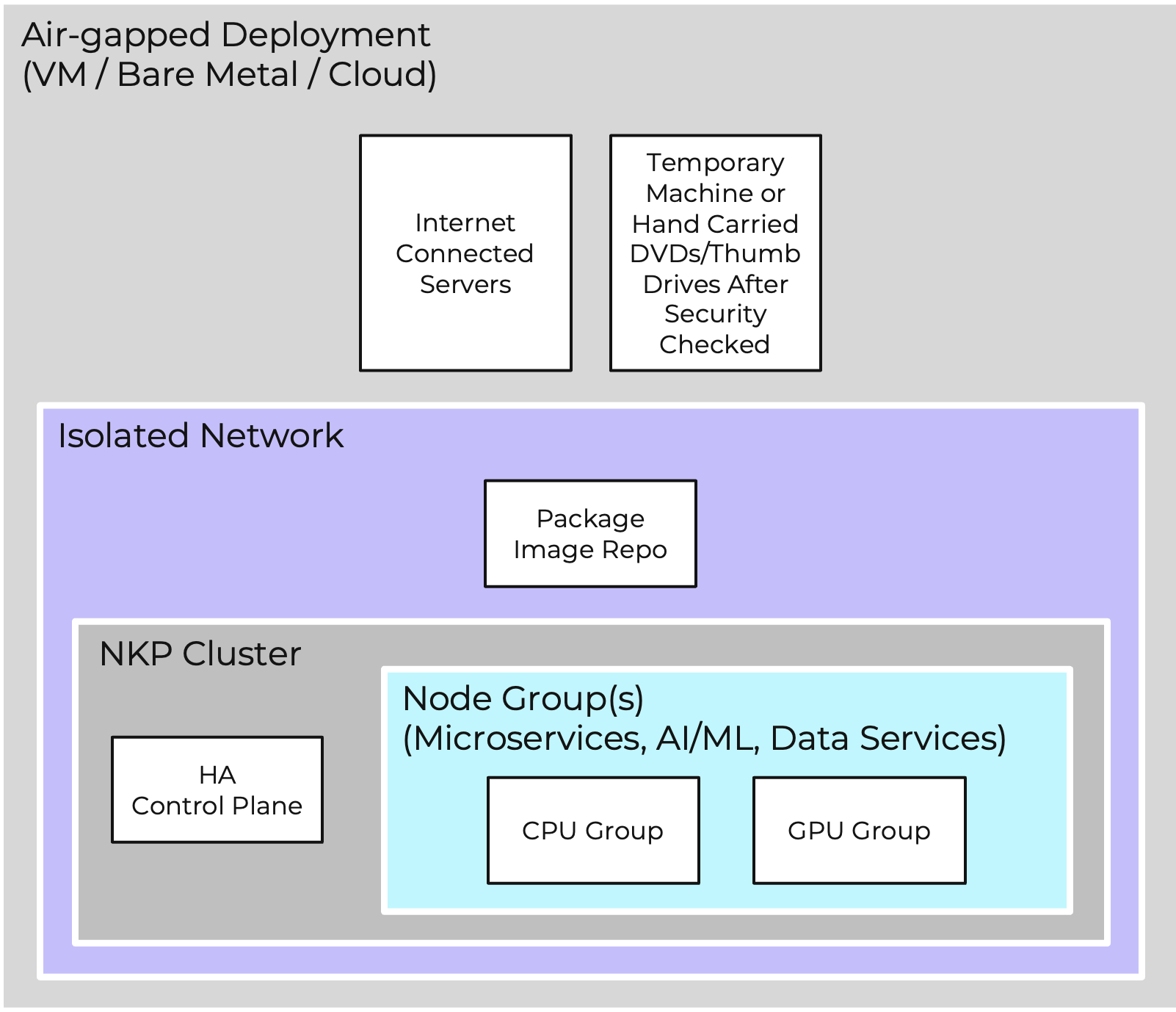
The process looks like this:
- Download the NKP air-gapped bundle (~15 GB) on a machine with internet
- Transfer it to the isolated network (USB drive, secure file transfer, etc.)
- Deploy directly from the bundle, or push the container images to an internal registry first. NKP can deploy Harbor as your internal registry if you don't already have one
- Run the same
nkpCLI commands, pointed at your local artifacts instead of Docker Hub
Note
In our ITCS Lab, we run a fully air-gapped NKP 2.17.1 setup with Harbor as the internal registry. All images, Helm charts, and OS artifacts are mirrored locally. This is the same approach we use for client deployments in regulated sectors across Luxembourg, France, and the wider EU.
Why This Matters in the EU
With NIS2 and DORA now in effect, organizations in critical infrastructure and financial services need to show they control their software supply chain. Air-gapped deployment gives you:
- No runtime dependencies on external registries
- Full control over which container images enter your environment
- An audit trail for every artifact
- Compliance with data sovereignty requirements
Platform Services
NKP ships with a full stack of services, all managed through Flux CD. Here's what you get out of the box:
Networking
| Service | What it does |
|---|---|
| Cilium | Default CNI on Nutanix AHV. Uses eBPF to handle networking directly in the kernel, bypassing iptables for significantly lower overhead. Supports L3-L7 policies and built-in observability via Hubble. Non-AHV providers (AWS, vSphere) default to Calico |
| Traefik v3 | Ingress controller with API Gateway capabilities |
| MetalLB | Gives you LoadBalancer services on bare metal / on-prem |
| kube-vip | Virtual IP for control plane high availability |
Observability
| Service | What it does |
|---|---|
| Prometheus + Grafana | Metrics and dashboards |
| AlertManager + Karma | Alert routing and visualization |
| Loki + Fluent Bit | Log collection and aggregation |
| Thanos | Long-term metrics storage backed by S3 |
| OpenCost | Cost tracking and allocation per namespace/team |
Security
| Service | What it does |
|---|---|
| Dex | OIDC broker. Connects to LDAP, SAML, GitHub, GitLab, etc. |
| cert-manager | Automated TLS certificates |
| Gatekeeper | Kubernetes admission controller built on OPA (Open Policy Agent) for policy enforcement |
| External Secrets Operator | Pulls secrets from external vaults |
| NKP Insights | CIS benchmarks, vulnerability scanning, deprecated API detection |
Storage and Backup
| Service | What it does |
|---|---|
| Nutanix CSI | Persistent volumes through Nutanix Volumes (iSCSI) and Files (NFS) |
| Nutanix Objects | S3-compatible object storage with COSI (Container Object Storage Interface) support |
| Velero | Backup and restore for clusters and workloads |
| Harbor | Container image registry (available with Pro/Ultimate license) |
| NDK | Nutanix Data Services for app-aware snapshots and replication |
Tip
You don't install these manually. They come as part of the Kommander installation and are lifecycle-managed through Flux CD. You can customize what you need through the NKP UI, the kommander.yaml config file, or as code using the Kubernetes API.
Licensing
NKP comes in four tiers:
| Tier | How you get it | What it includes |
|---|---|---|
| Starter | Included with NCI Pro/Ultimate | Unlimited K8s clusters on AHV with Rocky Linux OS. No extra cost |
| Pro | Separate purchase | BYO OS (Ubuntu, RHEL), GPU support, Harbor, multi-platform (vSphere, AWS, Azure) |
| Ultimate | Separate purchase | Fleet management, GitOps, multi-tenancy, attached clusters, cost tracking, NKP Insights |
| Full Stack Ultimate | Separate purchase | Bundles NCI Ultimate, NKP Ultimate, NDK, NUS, and NDB. Adds metro availability and synchronous replication |
Note
Starter is included at no extra cost with any NCI Pro or Ultimate license, and there's no limit on the number of clusters you can create. It's a solid way to get started. For managing multiple teams, attaching external clusters, or running on non-AHV infrastructure, you'll want Pro or Ultimate.
How Does It Compare?
| NKP | OpenShift | Rancher | |
|---|---|---|---|
| Kubernetes | Pure upstream CNCF | Forked (OKD) | Pure upstream |
| Cluster lifecycle | CAPI (YAML-driven) | Installer + MachineConfig | Rancher provisioner |
| GitOps | Flux CD (built-in) | ArgoCD (add-on) | Fleet (built-in) |
| CNI | Cilium on AHV, Calico elsewhere | OVN-Kubernetes | Canal / Calico |
| Air-gapped | First-class | Supported | Supported |
| Cost | Free Starter tier | Subscription required | Free community edition |
NKP's key strengths are upstream K8s without fork risk, Cilium as the default CNI on AHV, CAPI for portable cluster definitions, and seamless integration with the Nutanix storage and networking stack.
What's Next
In the next parts of this series, we get hands-on:
- Part 2: Prerequisites and internet-connected deployment. Setting up the jump host, configuring Prism Central, and deploying your first management cluster.
- Part 3: Air-gapped deployment. Registry mirror and bundle methods for regulated environments.
- Part 4: Day 2 configuration. Authentication with Dex and LDAP, RBAC setup, storage backends, monitoring.
- Part 5: Workload clusters and applications. Creating clusters, deploying apps, GitOps workflows.
- Part 6: Operations. Monitoring, backup, upgrades, and troubleshooting.
Every part includes real commands and output from our ITCS Lab running NKP 2.17.1 on Nutanix AHV.
Summary
NKP takes the complexity out of running Kubernetes at scale. Its architecture, built around CAPI for cluster lifecycle and Flux CD for GitOps, gives you repeatable and auditable infrastructure management.
For organizations in the EU dealing with NIS2 and DORA requirements, the air-gapped deployment, hardened node images, and built-in security scanning cover a lot of ground.
We've deployed NKP across multiple client environments in Luxembourg, the EU, and beyond, from single-cluster labs to multi-team production setups. This series captures what we've learned along the way.