Version note
This article was written for NKP 2.17. The current release is 2.18. See the Upgrade to NKP 2.18 series for the latest guidance.
In Part 2, we deployed an NKP management cluster with internet access. That's the simplest path, but in regulated environments (banking, government, defence), clusters often have no internet access at all.
This guide covers both air-gapped deployment methods: seeding a local registry mirror (Harbor) and deploying from bundle files. Both produce the same result, a fully operational NKP management cluster, but suit different infrastructure setups.
Why Air-Gap?
Air-gapped deployments aren't just a security preference. They're increasingly a regulatory requirement.
NIS2 (Network and Information Security Directive 2) and DORA (Digital Operational Resilience Act) are now in force across the EU. Both require organizations in critical infrastructure and financial services to demonstrate control over their software supply chain, including container images running in production.
Air-gapping gives you:
- No runtime dependencies on external registries: Docker Hub outages or rate limits can't bring down your deployments
- Full control over which container images enter your environment: every image is explicitly approved and transferred
- Audit trail for every artifact: you know exactly what version of every component is running
- Data sovereignty: no metadata or telemetry leaves your network
- Immutable deployments: the same bundle produces the same cluster every time, regardless of what upstream registries publish
Even outside regulated sectors, air-gapping eliminates the "works on my machine" class of deployment failures caused by upstream registry changes between deployments.
Prerequisites
What Changes from Internet-Connected
Most prerequisites are identical to Part 2. Here's what's different:
| Requirement | Internet-Connected | Air-Gapped |
|---|---|---|
| Outbound internet | Required (registries, Docker Hub) | Not needed from cluster nodes |
| Container images | Pulled from public registries | Pre-loaded from bundle or local registry |
| Registry | Optional (Docker Hub mirror) | Required: Harbor, Artifactory, Nexus, or ECR |
| NKP bundles | Not needed | Required: ~15 GB of tarballs |
| Bootstrap image | Pulled automatically | Must be docker load-ed manually |
| Jump host internet | Required during deployment | Only needed once (to download bundles), then air-gapped |
| NTP | Recommended | Critical: without internet time sources, NTP must point to an internal server |
Everything else stays the same: Prism Central (pc.7.3 or pc.7.5), PE cluster, subnet, storage container, OS image, and the PC credentials with CAPX permissions.
Network Architecture
The bastion host is the only machine that ever touches the bundles. Cluster nodes pull images exclusively from the local registry. There is zero outbound internet traffic from the cluster.
Air-Gapped Bundle Contents
Download the NKP Air-Gapped Bundle from the Nutanix Portal. It's a single tarball (~15 GB) that contains everything:
tar -xzvf nkp-air-gapped-bundle_v2.17.1_linux_amd64.tar.gz
After extraction:
nkp-v2.17.1/
├── application-charts/
│   ├── nkp-catalog-applications-charts-bundle-v2.17.1.tar.gz
│   ├── nkp-insights-charts-bundle-v2.17.1.tar.gz
│   └── nkp-kommander-charts-bundle-v2.17.1.tar.gz
├── application-repositories/
│   ├── nkp-catalog-applications-v2.17.1.tar.gz
│   ├── nkp-insights-v2.17.1.tar.gz
│   └── kommander-applications-v2.17.1.tar.gz
├── container-images/
│   ├── konvoy-image-bundle-v2.17.1.tar          # Core K8s + CAPI images
│   ├── kommander-image-bundle-v2.17.1.tar        # Platform service images
│   ├── nkp-catalog-applications-image-bundle-v2.17.1.tar
│   └── nkp-insights-image-bundle-v2.17.1.tar
├── nkp                                            # CLI binary
├── kubectl                                        # kubectl binary
├── konvoy-bootstrap-image-v2.17.1.tar            # KinD bootstrap image
└── kib/                                           # Image builder tools
    ├── konvoy-image/
    ├── ansible/
    └── artifacts/
| Bundle | Size (approx) | Contents |
|---|---|---|
konvoy-image-bundle |
~5 GB | Kubernetes, CAPI, CAPX, CNI, CSI images |
kommander-image-bundle |
~7 GB | Kommander, Prometheus, Grafana, Loki, Dex, Traefik, etc. |
nkp-catalog-applications-image-bundle |
~2 GB | Optional catalog apps (Harbor, Istio, etc.) |
nkp-insights-image-bundle |
~500 MB | NKP Insights scanning engines |
konvoy-bootstrap-image |
~200 MB | KinD image for bootstrap cluster |
Method 1: Registry Mirror (Harbor)
Overview
The registry mirror approach seeds all NKP container images into a local registry. During cluster creation, NKP configures containerd on every node to pull from this registry instead of public registries.
Pros:
- Reusable across multiple clusters: seed once, deploy many
- Supports image scanning (Harbor's built-in Trivy)
- Familiar Docker/OCI workflow
- Incremental updates: only push new/changed images for upgrades
Cons:
- Requires running registry infrastructure
- Registry must be highly available for cluster operations (node scaling, upgrades)
Best for: production environments, multi-cluster deployments, ongoing operations.
Deploy Harbor
You need a container registry accessible from both the bastion and all cluster nodes. NKP supports:
- Harbor (v2.1.1+), recommended, ships as an NKP platform app
- JFrog Artifactory (v7.11+)
- Nexus Repository Manager
- AWS ECR
For a standalone Harbor VM on Nutanix AHV:
| Component | Minimum |
|---|---|
| vCPU | 4 |
| RAM | 8 GiB |
| Disk | 200 GiB (depends on number of images) |
| OS | Rocky Linux 9, Ubuntu 22.04, or any Docker-capable Linux |
Install Harbor following the official documentation. The key configuration points in harbor.yml:
- Set
hostnameto the FQDN your cluster nodes will use - Configure HTTPS with your internal CA certificate, or use HTTP if your network is trusted
- Set
data_volumeto a directory with enough space for all NKP images
Tip
In our ITCS lab, Harbor runs on the same bastion host (thor.itcs.local) that we use for NKP management. It's accessible externally at thor.itcs.local:5000 (HTTPS) and internally from cluster nodes at harbor.itcs.local (HTTP). This dual-access pattern keeps things simple: the bastion pushes over HTTPS, and containerd pulls over HTTP on the trusted internal network.
Seed the Registry
Transfer the air-gapped bundle to the bastion, then push images to your registry.
Set Environment Variables
export REGISTRY_URL="https://registry.yourdomain.local"
export REGISTRY_USERNAME=admin
export REGISTRY_PASSWORD=YourRegistryPassword
export REGISTRY_CA=/path/to/registry-ca.crt
Push Container Images
Push both the Konvoy (core Kubernetes) and Kommander (platform services) image bundles:
nkp push bundle \
  --bundle ./container-images/konvoy-image-bundle-v2.17.1.tar \
  --bundle ./container-images/kommander-image-bundle-v2.17.1.tar \
  --to-registry=${REGISTRY_URL} \
  --to-registry-username=${REGISTRY_USERNAME} \
  --to-registry-password=${REGISTRY_PASSWORD} \
  --to-registry-ca-cert-file=${REGISTRY_CA}

This pushes hundreds of container images to your registry. Expect it to take 30-60 minutes depending on network speed between the bastion and registry.
If you need NKP Insights or catalog apps, push those bundles too:
# NKP Insights (Ultimate license)
nkp push bundle \
  --bundle ./container-images/nkp-insights-image-bundle-v2.17.1.tar \
  --to-registry=${REGISTRY_URL} \
  --to-registry-username=${REGISTRY_USERNAME} \
  --to-registry-password=${REGISTRY_PASSWORD} \
  --to-registry-ca-cert-file=${REGISTRY_CA}

# Catalog applications (Harbor, Istio, etc.)
nkp push bundle \
  --bundle ./container-images/nkp-catalog-applications-image-bundle-v2.17.1.tar \
  --to-registry=${REGISTRY_URL} \
  --to-registry-username=${REGISTRY_USERNAME} \
  --to-registry-password=${REGISTRY_PASSWORD} \
  --to-registry-ca-cert-file=${REGISTRY_CA}
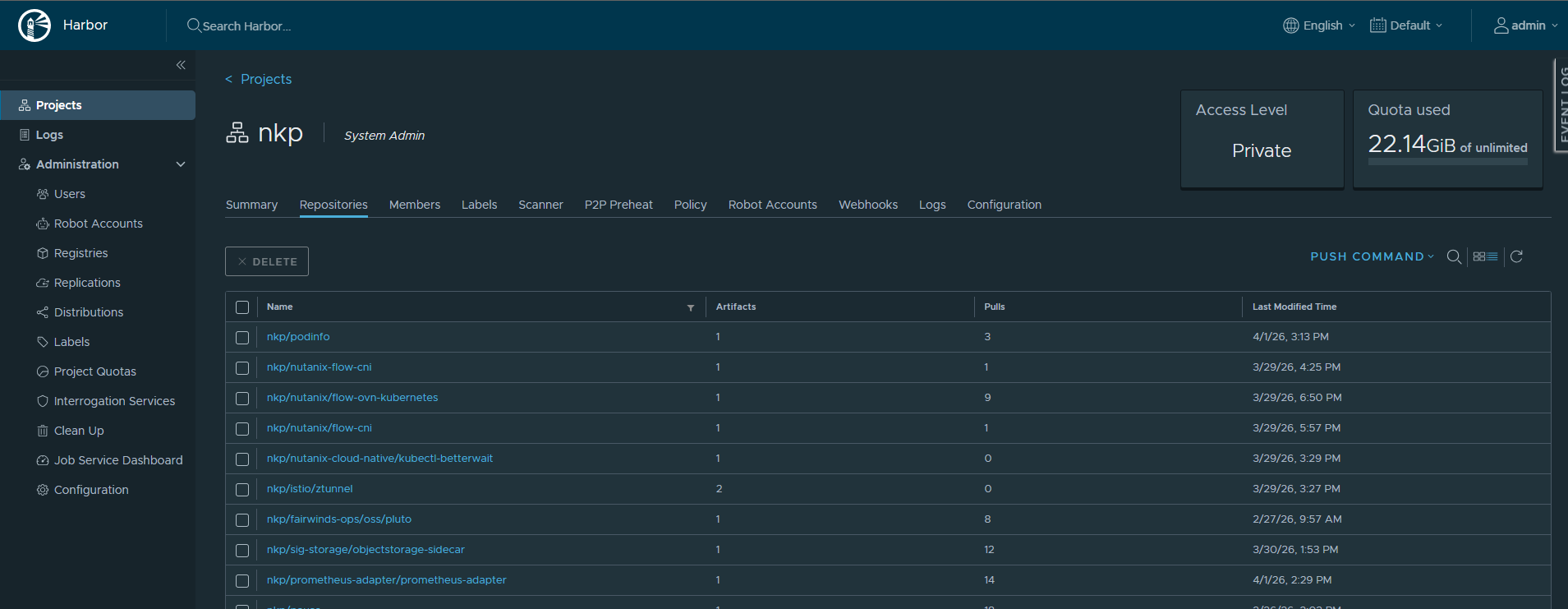
Note
You may see error messages like project not found, name: mesosphere during the push. These are false positives. NKP auto-creates the required projects/repositories in Harbor. The push continues and completes successfully.
Create the Cluster
Load the bootstrap image first. In air-gapped mode, Docker can't pull it from the internet:
docker load --input konvoy-bootstrap-image-v2.17.1.tar

Then create the cluster with registry mirror flags:
nkp create cluster nutanix \
  --cluster-name ${CLUSTER_NAME} \
  --endpoint "https://${NUTANIX_ENDPOINT}:9440" \
  --control-plane-prism-element-cluster ${NUTANIX_CLUSTER} \
  --control-plane-subnets ${NUTANIX_SUBNET} \
  --control-plane-endpoint-ip ${CONTROL_PLANE_VIP} \
  --control-plane-replicas 3 \
  --control-plane-vm-image "${NKP_IMAGE}" \
  --worker-prism-element-cluster ${NUTANIX_CLUSTER} \
  --worker-subnets ${NUTANIX_SUBNET} \
  --worker-replicas 4 \
  --worker-memory 32 \
  --worker-vm-image "${NKP_IMAGE}" \
  --kubernetes-service-load-balancer-ip-range "${LB_IP_RANGE}" \
  --csi-storage-container ${STORAGE_CONTAINER} \
  --ssh-username ${SSH_USERNAME} \
  --ssh-public-key-file ${SSH_PUBLIC_KEY} \
  --insecure \
  --self-managed \
  --airgapped \
  --registry-mirror-url=${REGISTRY_URL} \
  --registry-mirror-username=${REGISTRY_USERNAME} \
  --registry-mirror-password=${REGISTRY_PASSWORD} \
  --registry-mirror-cacert=${REGISTRY_CA}
The key differences from the internet-connected command in Part 2:
| Flag | Purpose |
|---|---|
--airgapped |
Enables air-gapped mode. Tells NKP not to expect internet access on cluster nodes |
--registry-mirror-url |
URL of your local registry. Containerd on every node is configured to pull from here |
--registry-mirror-username/password |
Credentials for the local registry |
--registry-mirror-cacert |
CA certificate for the registry's TLS cert. Required if using self-signed or internal CA |
Note
The dashboard hostname is configured in kommander.yaml (the clusterHostname field), not via the nkp create cluster command. Set it when you run nkp install kommander --installer-config kommander.yaml.
Important
Do not use --bundle flags together with --registry-mirror-* flags. Choose one approach: registry mirror (this section) or bundle-based (next section). Using both will cause conflicts.
Self-Signed Certificate Handling
Most air-gapped registries use self-signed or internal CA certificates. You need to get the CA cert and pass it to NKP:
# Extract CA cert from the registry
openssl s_client -showcerts \
  -connect registry.yourdomain.local:443 </dev/null | \
  openssl x509 -outform PEM > registry-ca.crt

# Pass it during cluster creation
--registry-mirror-cacert=registry-ca.crt
If Prism Central also uses a self-signed cert, add it separately:
--insecure=true                            # skip TLS for PC API calls
--additional-trust-bundle /path/to/ca.pem  # add to node trust store (max 16 KB)
Warning
The --additional-trust-bundle flag has a 16 KB size limit due to cloud-init constraints. If your CA chain exceeds this, combine only the root and intermediate CAs needed.
Method 2: Bundle-Based (No Registry)
Overview
The bundle approach loads container images directly into containerd on each node during bootstrap. No registry infrastructure is needed. Everything comes from tarball files on the bastion.
Pros:
- No registry infrastructure needed, fully self-contained
- Simplest to set up for a single cluster
- Good for PoC, demos, and temporary environments
Cons:
- Slower deployment: images are loaded per-node rather than pulled from a shared registry
- Larger data transfer: each node gets a copy of all images
- Harder to manage updates: no central image store to update
- Not practical for multi-cluster environments
Best for: single-cluster deployments, proof of concept, lab environments.
Download and Transfer Bundles
You need the same air-gapped bundle as Method 1. Download it on an internet-connected machine, then transfer to the bastion via USB drive, secure file transfer, or approved media.
The critical files for bundle-based deployment:
| File | Purpose |
|---|---|
konvoy-bootstrap-image-v2.17.1.tar |
Bootstrap KinD cluster image |
container-images/konvoy-image-bundle-v2.17.1.tar |
Core Kubernetes images |
container-images/kommander-image-bundle-v2.17.1.tar |
Kommander platform images |
application-repositories/kommander-applications-v2.17.1.tar.gz |
Kommander Helm charts |
Create the Cluster from Bundles
Load the bootstrap image first:
docker load --input konvoy-bootstrap-image-v2.17.1.tar
Then create the cluster using --bundle instead of --registry-mirror-*:
nkp create cluster nutanix \
  --cluster-name ${CLUSTER_NAME} \
  --endpoint "https://${NUTANIX_ENDPOINT}:9440" \
  --control-plane-prism-element-cluster ${NUTANIX_CLUSTER} \
  --control-plane-subnets ${NUTANIX_SUBNET} \
  --control-plane-endpoint-ip ${CONTROL_PLANE_VIP} \
  --control-plane-replicas 3 \
  --control-plane-vm-image "${NKP_IMAGE}" \
  --worker-prism-element-cluster ${NUTANIX_CLUSTER} \
  --worker-subnets ${NUTANIX_SUBNET} \
  --worker-replicas 4 \
  --worker-memory 32 \
  --worker-vm-image "${NKP_IMAGE}" \
  --kubernetes-service-load-balancer-ip-range "${LB_IP_RANGE}" \
  --csi-storage-container ${STORAGE_CONTAINER} \
  --ssh-username ${SSH_USERNAME} \
  --ssh-public-key-file ${SSH_PUBLIC_KEY} \
  --insecure \
  --self-managed \
  --airgapped \
  --bundle ./container-images/konvoy-image-bundle-v2.17.1.tar,./container-images/kommander-image-bundle-v2.17.1.tar
The --bundle flag accepts a comma-separated list of image tarballs. NKP loads these images into containerd on each node during the bootstrap process.
Install Kommander from Bundle
With --self-managed on Nutanix AHV, Kommander installation starts automatically. However, for the bundle method, you need to point Kommander at the local chart repository:
If you need to install Kommander manually (for customization or debugging):
# Generate air-gapped config
nkp install kommander --init --airgapped > kommander.yaml

# Edit kommander.yaml to customize apps, then install:
nkp install kommander \
  --installer-config kommander.yaml \
  --kubeconfig ${CLUSTER_NAME}.conf \
  --kommander-applications-repository \
    ./application-repositories/kommander-applications-v2.17.1.tar.gz
The --kommander-applications-repository flag is required for air-gapped installations. It points to the tarball containing all Kommander Helm charts. Without it, Flux CD can't resolve chart sources.
Verify the Air-Gapped Cluster
Run the same verification steps as Part 2:
# Get kubeconfig
nkp get kubeconfig --cluster-name ${CLUSTER_NAME} > ${CLUSTER_NAME}.conf
export KUBECONFIG=${CLUSTER_NAME}.conf

# 1. Nodes
kubectl get nodes

# 2. CAPI infrastructure
kubectl get clusters.cluster.x-k8s.io -A
kubectl get machines.cluster.x-k8s.io -A

# 3. Kommander HelmReleases
kubectl -n kommander wait --for condition=Ready helmreleases --all --timeout 20m

# 4. Storage
kubectl get pods -n ntnx-system
kubectl get storageclass

# 5. Networking
kubectl get pods -n kube-system -l app.kubernetes.io/name=cilium
kubectl get svc -n kommander traefik
Air-Gapped Specific Checks
Verify that images are coming from the local registry, not the internet:
# Check containerd mirror configuration on a node
ssh ${SSH_USERNAME}@<node-ip> "sudo cat /etc/containerd/config.toml | grep -A5 mirror"

# Verify no external registry connections
kubectl get events --all-namespaces | grep -i "pull" | grep -v "Successfully"
Gotchas We Found in Production
After deploying multiple air-gapped NKP clusters, here are the issues that aren't in the documentation.
flux-oci-mirror Bug (NKP 2.17 Bundle Method)
When deploying with the --bundle method (not registry mirror), nkp install kommander does not create the host-cluster-oci-creds secret or configure the secretRef in the OCI mirror source of truth. Without this, the Flux OCI mirror proxy generates an empty configuration, and all OCIRepositories fail with x509: certificate signed by unknown authority.
Symptoms:
# Empty config (just listen_addr, no mirror entries)
kubectl get secret flux-oci-mirror-config -n kommander-flux \
  -o jsonpath='{.data.config\.yaml}' | base64 -d

# OCIRepositories stuck in error
kubectl get ocirepository -n kommander
Fix:
# 1. Create the missing credentials secret
USERNAME=$(kubectl get secret dkp-credentials -n kommander \
  -o jsonpath='{.data.username}' | base64 -d)
PASSWORD=$(kubectl get secret dkp-credentials -n kommander \
  -o jsonpath='{.data.password}' | base64 -d)
kubectl create secret generic host-cluster-oci-creds -n kommander \
  --from-literal=username="$USERNAME" \
  --from-literal=password="$PASSWORD"

# 2. Patch oci-install-config ConfigMap
kubectl patch configmap oci-install-config -n kommander \
  --type merge -p '{"data":{"secretRef":"host-cluster-oci-creds"}}'

# 3. Patch KommanderCluster
kubectl patch kommandercluster host-cluster -n kommander \
  --type merge \
  -p '{"spec":{"ociRegistry":{"secretRef":{"name":"host-cluster-oci-creds"}}}}'

# 4. Restart source-controller to force re-reconciliation
kubectl rollout restart deploy/source-controller -n kommander-flux

# 5. Verify
kubectl get ocirepository -n kommander  # all should show True
Note
This is the install-time bundle-method bug, where host-cluster-oci-creds is never created on the management cluster. A separate x509: certificate signed by unknown authority failure appears later on workload clusters when the nkp-oci-proxy-ca trust bundle is not propagated into a workspace namespace. Same error string, different root cause. That per-cluster case is covered in Debugging x509 and Missing-Content Errors on NKP OCIRepositories.
Harbor Dual Passwords
When NKP deploys its own Harbor as a platform app in air-gapped mode, there are two separate admin passwords:
| Context | Secret | Namespace | Credentials |
|---|---|---|---|
| External access (browser, docker push) | harbor-admin-password |
ncr-system |
Admin password generated by Helm |
| Internal OCI proxy (containerd mirror) | host-cluster-oci-creds |
kommander |
admin:Harbor12345 (hardcoded default) |
The internal password is what containerd uses to pull images through the mirror. If you change the Harbor admin password externally, the internal proxy continues working with the original default.
Rook Ceph "Zombie App" Behavior
If you disable Rook Ceph in kommander.yaml (enabled: false), it will still get re-installed after applying a Pro or Ultimate license. The License Controller compares your cluster against the default app profile for your license tier and force-reinstalls any "missing" default apps.
Prevention:
# Annotate BEFORE deleting to prevent re-creation
kubectl annotate kommandercluster host-cluster -n kommander \
  kommander.d2iq.io/default-pro-app-deployments-created="true" --overwrite
kubectl annotate kommandercluster host-cluster -n kommander \
  kommander.d2iq.io/default-enterprise-app-deployments-created="true" --overwrite

# Now safe to delete
kubectl delete appdeployment rook-ceph rook-ceph-cluster -n kommander
Kommander Install: Run Only Once
In air-gapped mode, nkp install kommander should only be run once on a fresh cluster. Running it a second time can break the flux-oci-mirror proxy configuration. If the initial install times out (which is common, as the timeout is conservative), the resources are already deployed and converging. Check progress with:
kubectl -n kommander get helmreleases -w
Ongoing Operations in Air-Gapped Environments
Updating Images
Before upgrading NKP or deploying new applications, you must seed the new images first:
- Download the new NKP bundle on an internet-connected machine
- Transfer to the air-gapped bastion
- Push to registry:
nkp push bundle --bundle <new-bundle.tar> --to-registry=${REGISTRY_URL} ... - Upload the new OS image to Prism Central
- Run the upgrade command
This seed-transfer-push cycle is the operational overhead of air-gapped deployments. Every image change, whether it's an NKP upgrade, a new platform app, or a custom application, requires this workflow.
Adding Custom Applications
For your own workloads in an air-gapped cluster:
- Build your container images on an internet-connected CI system
- Push them to an intermediary registry or save as tarballs (
docker save) - Transfer to the air-gapped environment
- Push to your local registry (
docker pushorskopeo copy) - Reference the local registry URL in your Kubernetes manifests
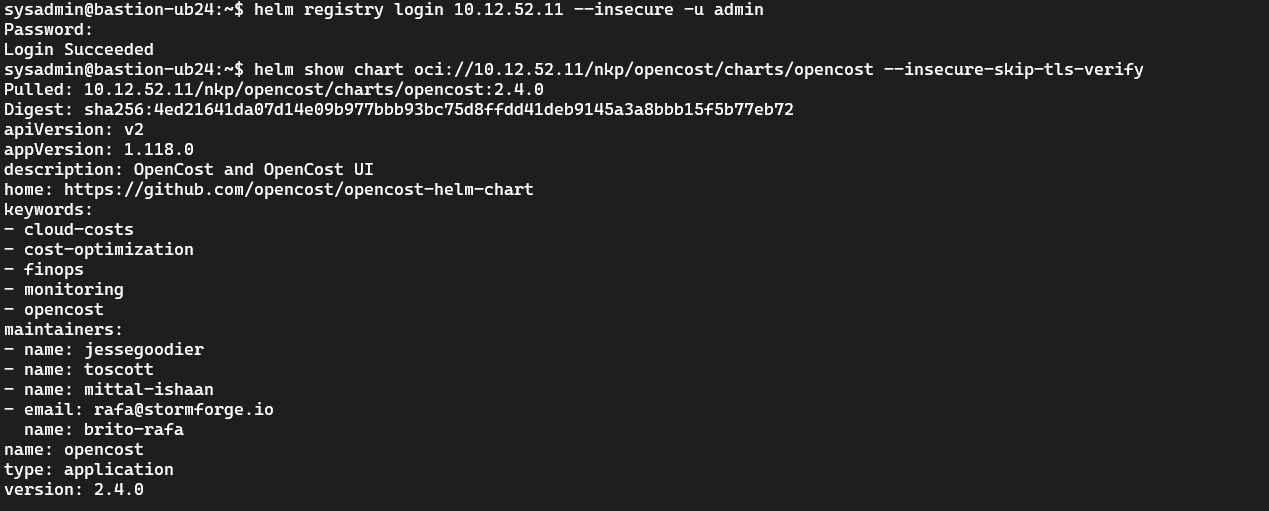
You can also inspect Helm charts stored in Harbor's OCI registry:
# Example: push a custom image to Harbor
skopeo copy --dest-tls-verify=false \
  docker-archive:my-app-v1.0.tar \
  docker://harbor.itcs.local/my-project/my-app:v1.0
Tip
In our ITCS lab, we use an in-cluster skopeo Job for images that need to go from the external Harbor port to the internal mirror project. This avoids TLS issues when pushing from WSL:
apiVersion: batch/v1
kind: Job
metadata:
  name: push-image
spec:
  template:
    spec:
      restartPolicy: Never
      containers:
      - name: skopeo
        image: quay.io/containers/skopeo:latest
        command: ["/bin/sh", "-c"]
        args:
        - |
          skopeo login harbor.itcs.local --tls-verify=false -u admin -p Harbor12345 &&
          skopeo copy --insecure-policy --dest-tls-verify=false --src-tls-verify=false \
            docker://source-registry/image:tag \
            docker://harbor.itcs.local/nkp/path/to/image:tag
Troubleshooting
| Symptom | Cause | Fix |
|---|---|---|
docker load fails |
Corrupt bundle or insufficient disk | Verify checksum, ensure 30+ GB free on bastion |
| Image pull errors during bootstrap | Registry not seeded or wrong URL | Verify nkp push bundle completed successfully, check registry URL |
| TLS errors connecting to registry | Self-signed cert not trusted | Use --registry-mirror-cacert with the registry CA cert |
| OCIRepositories stuck (x509 error) | flux-oci-mirror bug (bundle method) | Apply the 3-step fix described above |
| Kommander HelmReleases failing | Missing images in registry | Push the kommander and catalog bundles to the registry |
| Nodes can't pull images | Registry unreachable from node network | Verify DNS resolution and firewall rules (port 443 to registry) |
project not found: mesosphere during push |
Normal Harbor behavior | Safe to ignore, projects are auto-created |
| Rook Ceph re-appears after license apply | License Controller "zombie app" | Annotate KommanderCluster before deleting AppDeployments |
| Bootstrap timeout | Large bundles + slow disk I/O | Ensure bastion has SSD; use --timeout flag for longer waits |
Air-Gapped Firewall Rules
In addition to the standard NKP firewall rules from Part 2, air-gapped clusters need:
| Source | Destination | Port | Purpose |
|---|---|---|---|
| All cluster nodes | Local registry | 443 (or 5000) | Container image pulls |
| Bastion | Local registry | 443 (or 5000) | Bundle push |
| All cluster nodes | NTP server | 123/UDP | Time sync (mandatory) |
| Management cluster | Managed clusters | 443 | Cross-cluster communication |
| Managed clusters | Management cluster | 443 | Metrics, alerts, auth |
What's Next
Part 4: Day 2 Configuration covers authentication setup with Dex and LDAP/OIDC, RBAC configuration, storage backends, and monitoring. These steps apply equally to internet-connected and air-gapped clusters.
For a deployment with internet access, see Part 2. For architecture fundamentals, start with Part 1.
Summary
Two air-gapped methods, same result. The registry mirror approach (Harbor, Artifactory, Nexus) is better for production and multi-cluster environments: seed once, deploy many, update incrementally. The bundle-based approach is simpler for single clusters and PoC environments but doesn't scale well. In both cases, the cluster nodes never touch the internet. Every image, chart, and artifact is explicitly transferred and controlled. For organizations under NIS2 or DORA, this is the deployment model that satisfies supply chain security requirements.