Version note
This article was written for NKP 2.17. The current release is 2.18. See the Upgrade to NKP 2.18 series for the latest guidance.
Your management cluster is running. Now it needs to be production-ready.
This guide covers the essential Day 2 tasks: connecting enterprise authentication, setting up role-based access, configuring storage backends, managing certificates, and tuning the platform services. These steps apply whether your cluster was deployed with internet access (Part 2) or air-gapped (Part 3).
Authentication with Dex
How NKP Authentication Works
NKP uses Dex as its OIDC identity broker. Dex doesn't store identities itself. It connects to your existing identity providers (LDAP, Active Directory, GitLab, Entra ID, Okta, etc.) and translates their authentication into OIDC tokens that Kubernetes understands.
Four components work together:
| Component | Role |
|---|---|
| Dex | OIDC broker. Connects to identity providers, issues tokens |
| Traefik Forward Auth (TFA) | Intercepts all dashboard/UI requests, redirects to Dex for login |
| kube-oidc-proxy | Validates OIDC tokens for kubectl API access |
| dex-k8s-authenticator | Web UI that generates kubeconfig files for users after OIDC login |
Local Users (Static Passwords)
For initial setup, testing, or break-glass access, you can create local users directly in Dex. These are stored as bcrypt hashes in a ConfigMap, no external identity provider needed.
Generate password hashes:
echo "YourPassword" | htpasswd -BinC 10 admin | cut -d: -f2
Create local users via the dex-overrides ConfigMap in the kommander namespace:
apiVersion: v1
kind: ConfigMap
metadata:
  name: dex-overrides
  namespace: kommander
data:
  values.yaml: |
    config:
      expiry:
        idTokens: "48h"
      staticPasswords:
        - email: admin@itcs.local
          hash: "$2y$10$..."   # bcrypt hash
          username: admin
          userID: admin-001
        - email: demo@itcs.local
          hash: "$2y$10$..."
          username: demo
          userID: demo-001
The ConfigMap name matters: the Dex HelmRelease ships with dex-overrides as an optional valuesFrom entry by default, so creating the ConfigMap is enough. Flux picks it up on the next HelmRelease reconciliation and rolls the Dex pods. You can verify the wiring on your own cluster:
kubectl -n kommander get helmrelease dex -o jsonpath='{.spec.valuesFrom}'
# [..., {"kind":"ConfigMap","name":"dex-overrides","optional":true}, ...]
Note that Dex is the exception here, not the rule. Most platform apps (NKP Insights, Thanos, Grafana Loki) ignore an overrides ConfigMap until you also patch spec.configOverrides.name on their AppDeployment.
Tip
Set idTokens expiry to a reasonable value for your environment. The default is 24 hours. We use 48 hours in our lab to reduce re-authentication frequency during extended work sessions. For production, consider shorter values (4-8h) based on your security policy.
Connect LDAP / Active Directory
For enterprise environments, LDAP is the most common integration. NKP uses the Dex Connector CRD (dex.mesosphere.io/v1alpha1) to define identity provider connections.
Here's a complete Active Directory connector:
apiVersion: v1
kind: Secret
metadata:
  name: ldap-bind-secret
  namespace: kommander
type: Opaque
stringData:
  password: "YourServiceAccountPassword"
---
apiVersion: dex.mesosphere.io/v1alpha1
kind: Connector
metadata:
  name: ldap-ad
  namespace: kommander
spec:
  enabled: true
  type: ldap
  displayName: "Corporate Active Directory"
  ldap:
    host: ad-server.corp.local:389
    insecureNoSSL: true
    bindDN: svc-nkp@corp.local
    bindSecretRef:
      name: ldap-bind-secret
    userSearch:
      baseDN: "OU=NKP,DC=corp,DC=local"
      filter: "(objectClass=person)"
      username: sAMAccountName
      idAttr: DN
      emailAttr: mail
      nameAttr: name
    groupSearch:
      baseDN: "OU=NKP,DC=corp,DC=local"
      filter: "(objectClass=group)"
      nameAttr: cn
      userMatchers:
        - userAttr: DN
          groupAttr: member
Key points from our experience with Active Directory:
| Setting | What We Learned |
|---|---|
| Bind DN format | Use UPN format (svc-nkp@corp.local), not full DN. AD rejects the DN format for bind operations |
| Mail attribute | AD users must have the mail attribute populated. Dex requires it for user search. If your AD users don't have email, set emailAttr: userPrincipalName as a fallback |
| Plain LDAP | Port 389 with insecureNoSSL: true. For LDAPS, use port 636 and provide a rootCASecretRef pointing to a Secret with the AD CA cert |
| Group membership | Use userMatchers: [{userAttr: DN, groupAttr: member}]. This maps AD's member attribute (which contains full user DNs) to Dex group membership |
For LDAPS (TLS):
spec:
  ldap:
    host: ad-server.corp.local:636
    insecureNoSSL: false
    rootCASecretRef:
      name: ldap-root-ca-secret  # Secret containing the AD CA cert
    # ... rest same as above
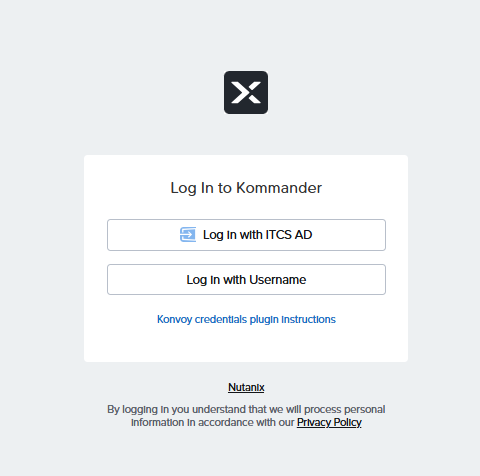
Once LDAP is configured, the Dex login page shows your identity providers alongside local username login:
Connect OIDC Provider (GitLab, Entra ID, Okta)
For cloud identity providers, use the OIDC connector type. The Connector CRD (dex.mesosphere.io/v1alpha1) has configuration blocks for exactly four types: github, ldap, oidc, and saml. There is no native gitlab type: upstream Dex supports one (you may see GitLab listed in the identity provider table in the NKP docs, which reproduces the upstream Dex matrix), but the NKP Connector CRD does not expose it. Use type: oidc with GitLab's OIDC discovery endpoint instead; it works with both gitlab.com and self-hosted GitLab.
GitLab OIDC
Setup on gitlab.com (or your self-hosted GitLab):
- User Settings > Applications (or Group Settings > Applications for group-level)
- Name:
NKP, Redirect URI:https://nkp.yourdomain.local/dex/callback - Scopes:
openid,profile,email. Confidential: yes
apiVersion: v1
kind: Secret
metadata:
  name: gitlab-oidc-secret
  namespace: kommander
type: Opaque
stringData:
  client-id: "your-gitlab-app-id"
  client-secret: "your-gitlab-client-secret"
---
apiVersion: dex.mesosphere.io/v1alpha1
kind: Connector
metadata:
  name: gitlab
  namespace: kommander
spec:
  enabled: true
  type: oidc
  displayName: "GitLab"
  oidc:
    issuer: "https://gitlab.com"
    clientSecretRef:
      name: gitlab-oidc-secret
    redirectURI: "https://nkp.yourdomain.local/dex/callback"
    scopes:
      - openid
      - profile
      - email
    claimMapping:
      email: "email"
      groups: "groups"
      preferred_username: "preferred_username"
Important
The Secret keys must be client-id and client-secret (with hyphens, not camelCase). The claimMapping fields must ALL be explicit strings. Null values cause the admission webhook to reject the resource.
Microsoft Entra ID (Azure AD)
apiVersion: dex.mesosphere.io/v1alpha1
kind: Connector
metadata:
  name: entra-id
  namespace: kommander
spec:
  enabled: true
  type: oidc
  displayName: "Microsoft Entra ID"
  oidc:
    issuer: "https://login.microsoftonline.com/<tenant-id>/v2.0"
    clientSecretRef:
      name: entra-oidc-secret
    redirectURI: "https://nkp.yourdomain.local/dex/callback"
    scopes:
      - openid
      - profile
      - email
      - groups
Generate Kubeconfig for Users
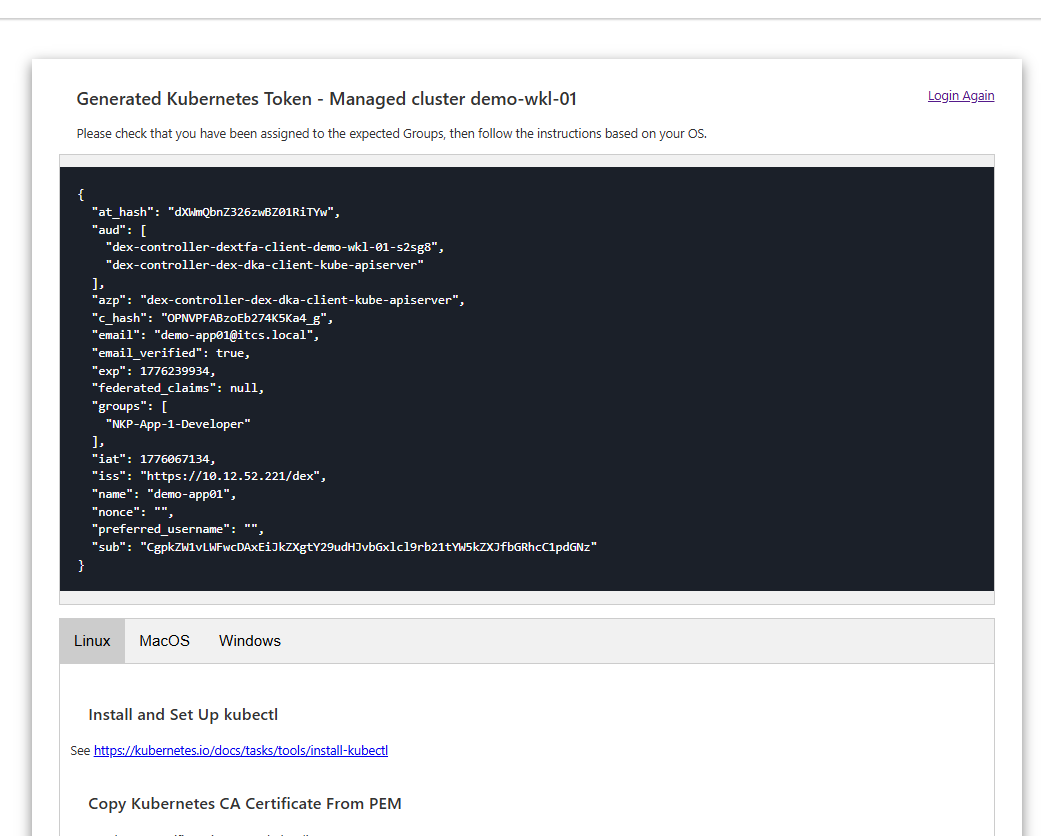
Once authentication is configured, users get kubectl access through the dex-k8s-authenticator web UI:
- Navigate to
https://nkp.yourdomain.local/token - Select their identity provider (LDAP, GitLab, etc.)
- Complete the login flow
- Copy the generated kubeconfig
The generated kubeconfig contains an OIDC token that kube-oidc-proxy validates on every API call.
Role-Based Access Control (RBAC)
NKP's 3-Layer RBAC Model
NKP extends standard Kubernetes RBAC with a 3-layer model that maps to its workspace/project hierarchy:
| Layer | Scope | What It Controls | Example |
|---|---|---|---|
| Global | Entire management cluster | Platform administration, workspace creation | Platform admins, SREs |
| Workspace | All clusters in a workspace | Team-level access, app deployment | Team leads, DevOps engineers |
| Project | Specific namespaces in specific clusters | Application access, secret management | Developers, CI/CD pipelines |
Each layer uses different Kubernetes resources:
Layer 1 (Global):    ClusterRoleBinding → ClusterRole
Layer 2 (Workspace): RoleBinding (workspace namespace) → Role / ClusterRole
Layer 3 (Project):   RoleBinding (project namespace) → Role / ClusterRole
VirtualGroups
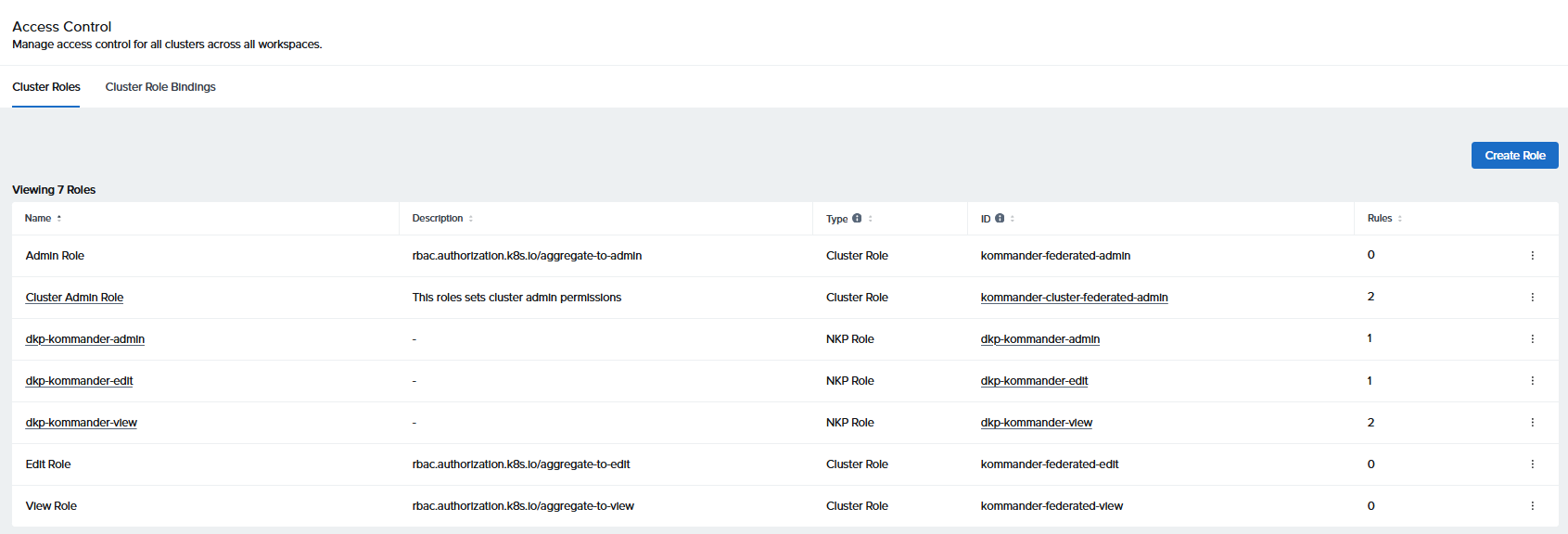
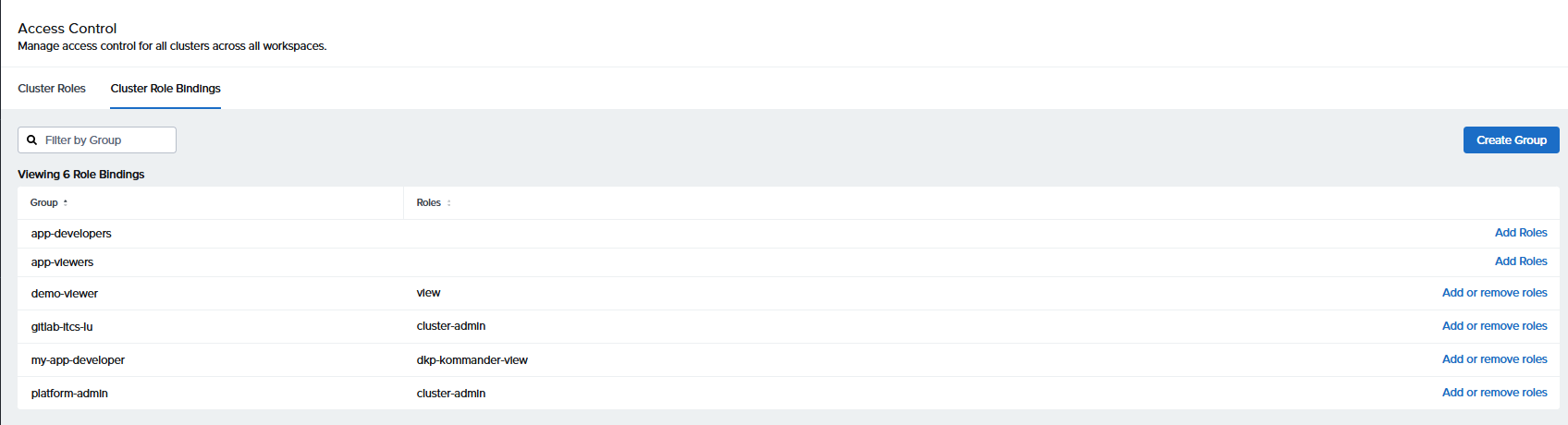
NKP introduces VirtualGroups to bridge identity provider groups with Kubernetes RBAC. A VirtualGroup is a cluster-scoped Kommander CRD that:
- Maps one or more identity provider subjects (users, groups) to a logical group name
- Can be bound to roles at any scope (global, workspace, project)
- Federates bindings to workload clusters automatically
- Appears in the NKP UI under Access Control → Cluster Role Bindings
apiVersion: kommander.mesosphere.io/v1beta1
kind: VirtualGroup
metadata:
  name: platform-admin
spec:
  subjects:
    - apiGroup: rbac.authorization.k8s.io
      kind: User
      name: admin@itcs.local
    - apiGroup: rbac.authorization.k8s.io
      kind: Group
      name: "oidc:nkp-admins"
Bind a VirtualGroup to a ClusterRole using the VirtualGroupKommanderClusterRoleBinding CRD (workspaces.kommander.mesosphere.io/v1alpha1). This is the Kommander-native way to create global bindings that federate to workload clusters and show up in the NKP dashboard. A similarly named VirtualGroupClusterRoleBinding kind also exists under kommander.mesosphere.io/v1beta1; NKP creates those itself for its built-in groups. Do not mix the two: each kind only applies with its own apiVersion.
apiVersion: workspaces.kommander.mesosphere.io/v1alpha1
kind: VirtualGroupKommanderClusterRoleBinding
metadata:
  name: platform-admin-cluster-admin
spec:
  clusterRoleRef:
    name: cluster-admin
  virtualGroupRef:
    name: platform-admin
VirtualGroups vs Raw K8s Bindings
There are two ways to bind users to roles at the global level, and they behave very differently:
| VirtualGroup + VirtualGroupKommanderClusterRoleBinding | Raw K8s ClusterRoleBinding | |
|---|---|---|
| Visible in NKP UI | Yes (Access Control → Cluster Role Bindings) | No |
| Federates to workload clusters | Yes, automatically | No, management cluster only |
| Works when Dex/OIDC is down | No (depends on OIDC tokens) | Yes (direct K8s RBAC) |
| Use case | Normal operations, multi-cluster RBAC | Break-glass access when identity providers are unavailable |
In practice, you create both for critical admin accounts. The VirtualGroup handles day-to-day federated access, while the raw K8s binding provides emergency access:
# ── Kommander way: federates everywhere, visible in UI ──────────────
apiVersion: kommander.mesosphere.io/v1beta1
kind: VirtualGroup
metadata:
  name: platform-admin
spec:
  subjects:
    - apiGroup: rbac.authorization.k8s.io
      kind: User
      name: admin@itcs.local
---
apiVersion: workspaces.kommander.mesosphere.io/v1alpha1
kind: VirtualGroupKommanderClusterRoleBinding
metadata:
  name: platform-admin-cluster-admin
spec:
  clusterRoleRef:
    name: cluster-admin
  virtualGroupRef:
    name: platform-admin

---
# ── Raw K8s way: break-glass, mgmt cluster only, does NOT federate ──
apiVersion: rbac.authorization.k8s.io/v1
kind: ClusterRoleBinding
metadata:
  name: itcs-admin-binding
roleRef:
  apiGroup: rbac.authorization.k8s.io
  kind: ClusterRole
  name: cluster-admin
subjects:
  - apiGroup: rbac.authorization.k8s.io
    kind: User
    name: admin@itcs.local
Important
LDAP groups passed through Dex must have the oidc: prefix in VirtualGroup subjects. Dex translates LDAP group names into OIDC claims, so Kubernetes sees them as oidc:<group-name>. Without the prefix, the binding won't match. Subjects must include apiGroup: rbac.authorization.k8s.io.
Built-in Roles
NKP ships several built-in roles at each scope:
| Role | Scope | Permissions |
|---|---|---|
cluster-admin |
Global | Full cluster access (K8s built-in) |
view |
Global | Read-only across all namespaces (K8s built-in) |
kommander-workspace-admin-* |
Workspace | Full access to workspace resources, projects, apps |
kommander-workspace-view-* |
Workspace | Read-only access to workspace resources |
kommander-project-admin-* |
Project | Full access within a project namespace |
The * suffix is a random string that NKP generates per workspace (e.g., kommander-workspace-admin-vp2v7). You need to discover these names in your environment:
# Find workspace roles
kubectl get clusterroles | grep kommander-workspace
kubectl get roles -n <workspace-namespace> | grep kommander
Example: Workspace Admin
Here's a complete RBAC setup for a workspace admin. This gives demo-ws-admin@itcs.local full control over the demo workspace and its projects, including project management and NKP Insights access:
# Layer 1: Global. Can see and manage the workspace in the dashboard
apiVersion: rbac.authorization.k8s.io/v1
kind: ClusterRoleBinding
metadata:
  name: demo-workspace-admin-binding
subjects:
  - kind: User
    name: demo-ws-admin@itcs.local
    apiGroup: rbac.authorization.k8s.io
roleRef:
  kind: ClusterRole
  name: kommander-workspace-admin-vp2v7   # discover this name
  apiGroup: rbac.authorization.k8s.io
---
# Layer 2: Workspace. Full admin in workspace namespace
apiVersion: rbac.authorization.k8s.io/v1
kind: RoleBinding
metadata:
  name: demo-workspace-admin-binding
  namespace: demo                          # workspace namespace
subjects:
  - kind: User
    name: demo-ws-admin@itcs.local
    apiGroup: rbac.authorization.k8s.io
roleRef:
  kind: Role
  name: kommander-workspace-admin-qnc42   # discover this name
  apiGroup: rbac.authorization.k8s.io
---
# Layer 2b: Workspace. Project management (create/delete/edit projects)
apiVersion: rbac.authorization.k8s.io/v1
kind: RoleBinding
metadata:
  name: demo-workspace-admin-projects-binding
  namespace: demo
subjects:
  - kind: User
    name: demo-ws-admin@itcs.local
    apiGroup: rbac.authorization.k8s.io
roleRef:
  kind: Role
  name: ws-kommander-workspace-admin-z4nr7  # discover this name
  apiGroup: rbac.authorization.k8s.io
---
# Layer 2c: Workspace. NKP Insights access
apiVersion: rbac.authorization.k8s.io/v1
kind: RoleBinding
metadata:
  name: demo-workspace-admin-insights-binding
  namespace: demo
subjects:
  - kind: User
    name: demo-ws-admin@itcs.local
    apiGroup: rbac.authorization.k8s.io
roleRef:
  kind: Role
  name: nkp-insights-all
  apiGroup: rbac.authorization.k8s.io
---
# Layer 3: Project. Full admin in project namespace
apiVersion: rbac.authorization.k8s.io/v1
kind: RoleBinding
metadata:
  name: demo-workspace-admin-binding
  namespace: demo-apps-h6n8q              # project namespace
subjects:
  - kind: User
    name: demo-ws-admin@itcs.local
    apiGroup: rbac.authorization.k8s.io
roleRef:
  kind: Role
  name: kommander-project-admin-m85v2     # discover this name
  apiGroup: rbac.authorization.k8s.io
Note
Each workspace generates multiple auto-created roles with random suffixes. Discover them with:
kubectl get roles -n demo | grep kommander
kubectl get clusterroles | grep kommander-workspace
You'll find separate roles for workspace admin, project management (ws-kommander-workspace-admin-*), and NKP Insights (nkp-insights-all).
Example: Developer with Limited Access
For a developer who needs GitOps and ConfigMap/Secret access but shouldn't create clusters or enable platform apps. This is a view-only base with targeted write permissions:
# Layer 1: Global. Read-only dashboard navigation
apiVersion: rbac.authorization.k8s.io/v1
kind: ClusterRoleBinding
metadata:
  name: demo-workspace-developer-binding
subjects:
  - kind: User
    name: developer@itcs.local
    apiGroup: rbac.authorization.k8s.io
roleRef:
  kind: ClusterRole
  name: kommander-workspace-view-hwx2w    # discover this name
  apiGroup: rbac.authorization.k8s.io
---
# Layer 2: Workspace. View-only base
apiVersion: rbac.authorization.k8s.io/v1
kind: RoleBinding
metadata:
  name: demo-ws-dev-view
  namespace: demo
subjects:
  - kind: User
    name: developer@itcs.local
    apiGroup: rbac.authorization.k8s.io
roleRef:
  kind: Role
  name: kommander-workspace-view-4tb4q    # discover this name
  apiGroup: rbac.authorization.k8s.io
---
# Layer 2b: Workspace. List projects (read-only)
apiVersion: rbac.authorization.k8s.io/v1
kind: RoleBinding
metadata:
  name: demo-ws-dev-projects
  namespace: demo
subjects:
  - kind: User
    name: developer@itcs.local
    apiGroup: rbac.authorization.k8s.io
roleRef:
  kind: Role
  name: ws-kommander-workspace-view-g7spz  # discover this name
  apiGroup: rbac.authorization.k8s.io
The custom role adds targeted write access on top of the read-only base. It's deliberately stripped of apps.kommander.d2iq.io (prevents enabling/disabling platform apps) and cluster.x-k8s.io (prevents cluster creation):
# Custom Role: GitOps + ConfigMap/Secret write access
apiVersion: rbac.authorization.k8s.io/v1
kind: Role
metadata:
  name: developer-gitops-configmap
  namespace: demo
rules:
  # K8s ConfigMaps and Secrets
  - apiGroups: [""]
    resources: ["configmaps", "secrets"]
    verbs: ["create", "update", "patch", "delete"]
  # Federated ConfigMaps/Secrets (multi-cluster push via Kommander UI)
  - apiGroups: ["types.kubefed.io"]
    resources: ["federatedconfigmaps", "federatedsecrets"]
    verbs: ["create", "update", "patch", "delete"]
  # Flux GitOps sources (Add GitOps Source button)
  - apiGroups: ["source.toolkit.fluxcd.io"]
    resources: ["gitrepositories", "helmrepositories", "ocirepositories", "buckets", "helmcharts"]
    verbs: ["create", "update", "patch", "delete"]
  # Flux Kustomizations and HelmReleases
  - apiGroups: ["kustomize.toolkit.fluxcd.io"]
    resources: ["kustomizations"]
    verbs: ["create", "update", "patch", "delete"]
  - apiGroups: ["helm.toolkit.fluxcd.io"]
    resources: ["helmreleases"]
    verbs: ["create", "update", "patch", "delete"]
  # Kommander UI CRDs (action buttons, status rendering)
  - apiGroups: ["kommander.d2iq.io"]
    resources: ["*"]
    verbs: ["get", "list", "watch", "patch", "update", "create"]
  # Dispatch CI/CD CRDs
  - apiGroups: ["dispatch.d2iq.io"]
    resources: ["*"]
    verbs: ["get", "list", "watch", "patch", "update", "create"]
  # NKP Insights CRDs (scan results)
  - apiGroups: ["dkp-insights.d2iq.io"]
    resources: ["*"]
    verbs: ["get", "list", "watch", "patch", "update", "create"]
---
# Bind the custom role in the workspace namespace
apiVersion: rbac.authorization.k8s.io/v1
kind: RoleBinding
metadata:
  name: demo-ws-dev-gitops
  namespace: demo
subjects:
  - kind: User
    name: developer@itcs.local
    apiGroup: rbac.authorization.k8s.io
roleRef:
  kind: Role
  name: developer-gitops-configmap
  apiGroup: rbac.authorization.k8s.io
Tip
Create the same custom role and binding in the project namespace too (e.g., demo-apps-h6n8q). Without it, the developer can view the project but can't edit ConfigMaps, Secrets, or GitOps resources inside it.
Note
The kommander.d2iq.io, dispatch.d2iq.io, and dkp-insights.d2iq.io API groups are needed for the Kommander UI buttons (GitOps, configmaps, insights) to work. Without them, the user sees the pages but can't interact with anything. The custom role intentionally omits apps.kommander.d2iq.io to prevent enabling/disabling platform apps.
RBAC Gotchas
| Issue | What We Learned |
|---|---|
| roleRef is immutable | You can't change the roleRef on an existing binding. Delete and recreate instead |
| Deletion order matters | The admission webhook enforces: delete bindings BEFORE roles. Deleting a role while bindings reference it is rejected |
| Project sidebar visibility | K8s RBAC list is all-or-nothing. A user with project-level access will see ALL projects in the sidebar, but can only access their own. This is a platform limitation, not a misconfiguration |
| KommanderWorkspaceRole location | Must be in the workspace namespace, not kommander. The controller only watches workspace namespaces |
| GraphQL mutations | The dashboard's GraphQL endpoint at /dkp/kommander/dashboard/graphql allows mutations. You cannot restrict per-operation, it's all-or-nothing |
Storage Configuration
Nutanix CSI Driver
The Nutanix CSI driver is deployed automatically during cluster creation. It provides:
- Nutanix Volumes (block/iSCSI): default StorageClass
nutanix-volume - Nutanix Files (NFS): requires a Nutanix Files server
# Verify CSI is running
kubectl get pods -n ntnx-system
kubectl get storageclass
kubectl get csidrivers
Custom StorageClasses
Create additional StorageClasses for different workload requirements:
# SSD-tier with flash mode enabled
apiVersion: storage.k8s.io/v1
kind: StorageClass
metadata:
  name: nutanix-volume-ssd
provisioner: csi.nutanix.com
parameters:
  storageType: NutanixVolumes
  storageContainer: ssd-container
  flashMode: ENABLED
  hypervisorAttached: ENABLED
reclaimPolicy: Delete
volumeBindingMode: WaitForFirstConsumer
allowVolumeExpansion: true
---
# NFS for ReadWriteMany workloads (requires Nutanix Files)
apiVersion: storage.k8s.io/v1
kind: StorageClass
metadata:
  name: nutanix-files
provisioner: csi.nutanix.com
parameters:
  storageType: NutanixFiles
  nfsServerName: files-server-1
  dynamicProv: ENABLED
reclaimPolicy: Delete
Nutanix Objects for Platform Services
Instead of Rook Ceph (NKP's default S3 backend for Loki, Velero, and NKP Insights), we use Nutanix Objects, an enterprise S3-compatible service that's already part of the Nutanix stack.
This requires creating S3 credential secrets before installing Kommander:
# Loki log storage (secret name MUST be "dkp-loki", hardcoded in NKP)
apiVersion: v1
kind: Secret
metadata:
  name: dkp-loki
  namespace: kommander
type: Opaque
stringData:
  AWS_ACCESS_KEY_ID: "<OBJECTS_ACCESS_KEY>"
  AWS_SECRET_ACCESS_KEY: "<OBJECTS_SECRET_KEY>"
---
# Velero backup storage
apiVersion: v1
kind: Secret
metadata:
  name: velero-nutanix-credentials
  namespace: kommander
type: Opaque
stringData:
  aws: |
    [ntnx-object-nkp]
    aws_access_key_id = <OBJECTS_ACCESS_KEY>
    aws_secret_access_key = <OBJECTS_SECRET_KEY>
Then configure the platform apps in kommander.yaml:
apps:
  grafana-loki:
    enabled: true
    values: |
      loki:
        structuredConfig:
          storage_config:
            aws:
              s3: "https://objects.yourdomain.local/nkp-loki"
              region: us-east-1
              s3forcepathstyle: false
              http_config:
                insecure_skip_verify: true
          limits_config:
            retention_period: 360h    # 15 days

  velero:
    enabled: true
    values: |
      configuration:
        backupStorageLocation:
          - name: nutanix-objects
            bucket: nkp-velero
            provider: "aws"
            default: true
            config:
              region: us-east-1
              s3ForcePathStyle: "false"
              insecureSkipTLSVerify: "true"
              s3Url: "https://objects.yourdomain.local"
              profile: ntnx-object-nkp
            credential:
              key: aws
              name: velero-nutanix-credentials

  # Disable Rook Ceph since we use Objects
  rook-ceph:
    enabled: false
  rook-ceph-cluster:
    enabled: false
Warning
If your Nutanix Objects endpoint uses a self-signed TLS certificate (common, as the cert is typically for OBJECT.prism-central.cluster.local, not your FQDN), you must set insecure_skip_verify: true for Loki and insecureSkipTLSVerify: "true" for Velero. Without this, S3 operations will fail with TLS verification errors.
Thanos for Long-Term Metrics
Prometheus stores metrics locally with a configurable retention. For long-term storage, enable Thanos, which uploads Prometheus TSDB blocks to S3:
# Secret with S3 credentials
apiVersion: v1
kind: Secret
metadata:
  name: thanos-objstore-secret
  namespace: kommander
type: Opaque
stringData:
  objstore.yml: |
    type: S3
    config:
      bucket: nkp-thanos
      endpoint: objects.yourdomain.local
      region: us-east-1
      access_key: "<OBJECTS_ACCESS_KEY>"
      secret_key: "<OBJECTS_SECRET_KEY>"
      http_config:
        insecure_skip_verify: true
Configure Prometheus to use Thanos sidecar and set retention policies via ConfigMap overrides:
# kube-prometheus-stack overrides
apiVersion: v1
kind: ConfigMap
metadata:
  name: kube-prometheus-stack-overrides
  namespace: kommander
data:
  values.yaml: |
    prometheus:
      prometheusSpec:
        retention: 30d
        storageSpec:
          volumeClaimTemplate:
            spec:
              resources:
                requests:
                  storage: 100Gi
        thanos:
          objectStorageConfig:
            existingSecret:
              name: thanos-objstore-secret
              key: objstore.yml
Certificate Management
Replace the Default CA
NKP creates a self-signed CA (kommander-ca ClusterIssuer) during installation. For production, replace it with your enterprise CA:
# Generate a new CA (or use your enterprise CA cert + key)
openssl genrsa -out ca.key 4096
openssl req -x509 -new -nodes -key ca.key -sha256 -days 3650 \
  -subj "/CN=Your NKP CA/O=YourOrg" -out ca.crt

# Replace the CA secret
kubectl create secret tls kommander-ca -n cert-manager \
  --cert=ca.crt --key=ca.key --dry-run=client -o yaml | kubectl apply -f -

# Force re-issuance of all certificates
kubectl delete secret \
  kommander-traefik-tls \
  dex-tls \
  dex-client-tls \
  kube-oidc-proxy-server-tls \
  -n kommander

# Verify new certs
kubectl get secret kommander-traefik-tls -n kommander \
  -o jsonpath='{.data.tls\.crt}' | base64 -d | \
  openssl x509 -noout -subject -issuer
cert-manager will automatically re-issue all certificates using the new CA. Export the CA cert for client trust stores:
kubectl get secret kommander-ca -n cert-manager \
  -o jsonpath='{.data.tls\.crt}' | base64 -d > nkp-ca.crt
Distribute nkp-ca.crt to all clients that need to trust the NKP dashboard (browsers, kubectl, CI/CD pipelines).
Platform Service Customization
Monitoring (Prometheus / Grafana)
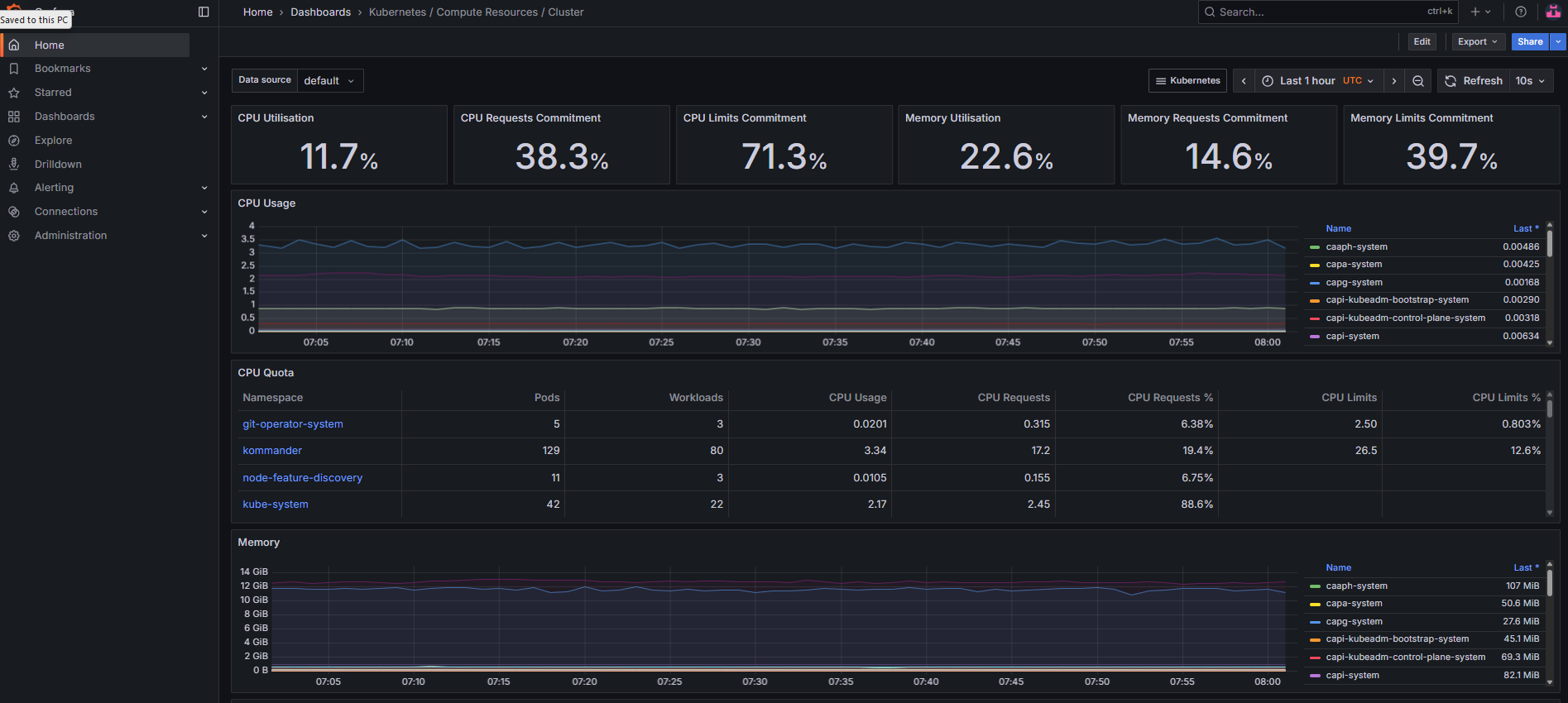
Prometheus sizing depends on your cluster size:
| Nodes | CPU Limit | Memory Limit | Storage |
|---|---|---|---|
| 10 | 500m | 2192 Mi | 35 Gi |
| 25 | 2 | 6 Gi | 60 Gi |
| 50 | 7 | 28 Gi | 100 Gi |
| 100 | 12 | 50 Gi | 100 Gi |
Custom alerting rules via kommander.yaml:
apps:
  kube-prometheus-stack:
    values: |
      alertmanager:
        config:
          route:
            group_by: ['alertname', 'namespace']
            receiver: "null"
            routes:
              - match:
                  alertname: Watchdog
                receiver: "null"
              - match:
                  severity: critical
                receiver: slack-critical
          receivers:
            - name: "null"
            - name: slack-critical
              slack_configs:
                - channel: '#nkp-alerts'
                  send_resolved: true
Logging (Loki / Fluent Bit)
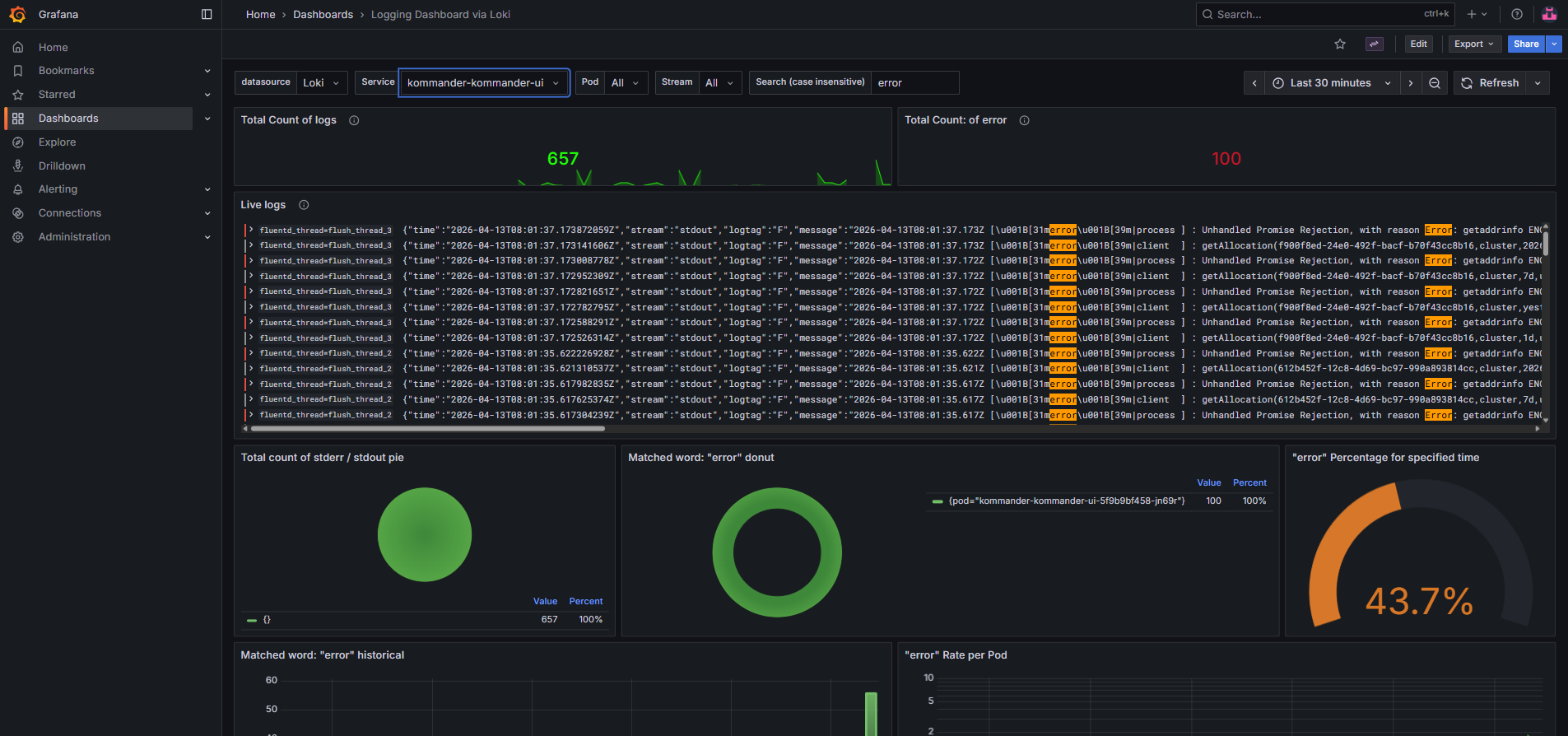
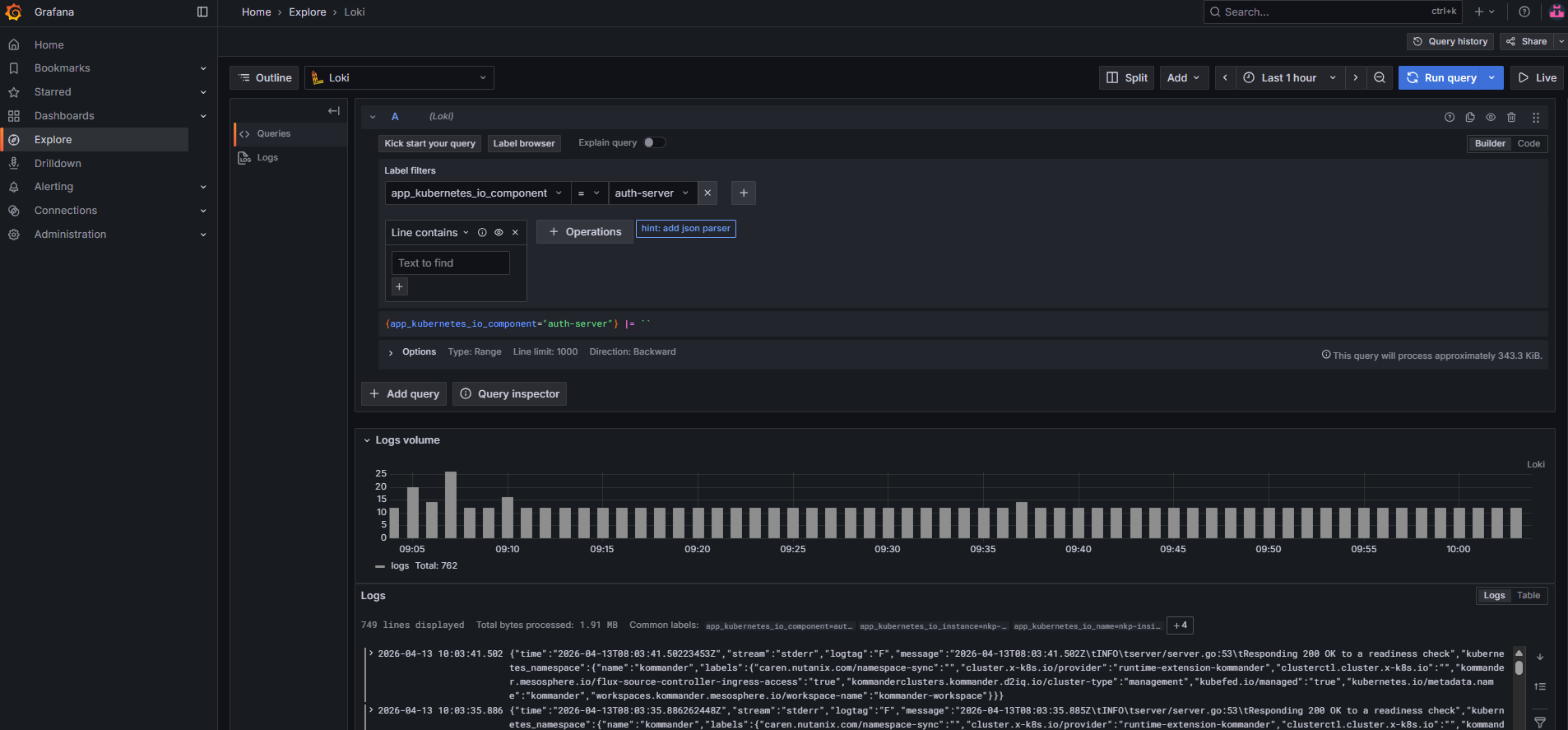
The logging pipeline is: Fluent Bit (DaemonSet, per-node) → Fluentd (aggregator) → Loki → S3.
For high-volume clusters (50+ nodes), tune the Fluentd aggregator:
apps:
  logging-operator:
    values: |
      fluentd:
        scaling:
          replicas: 10
        resources:
          requests:
            memory: 1000Mi
            cpu: 1000m
        bufferStorageVolume:
          emptyDir:
            medium: Memory
        disablePvc: true
      fluentbit:
        inputTail:
          Mem_Buf_Limit: 512MB
Security Hardening
OPA Gatekeeper
Gatekeeper ships pre-configured with NKP's multi-tenancy constraint templates. Add custom policies for your organization:
# Block privileged containers
apiVersion: constraints.gatekeeper.sh/v1beta1
kind: K8sPSPPrivilegedContainer
metadata:
  name: deny-privileged
spec:
  match:
    kinds:
      - apiGroups: [""]
        kinds: ["Pod"]
    excludedNamespaces:
      - kube-system
      - kommander
      - ntnx-system
Pod Security Admission (PSA)
Apply PSA labels to tenant namespaces for defense-in-depth alongside Gatekeeper:
kubectl label namespace <tenant-ns> \
  pod-security.kubernetes.io/enforce=baseline \
  pod-security.kubernetes.io/enforce-version=latest \
  pod-security.kubernetes.io/warn=restricted \
  pod-security.kubernetes.io/warn-version=latest \
  pod-security.kubernetes.io/audit=restricted \
  pod-security.kubernetes.io/audit-version=latest \
  --overwrite
This enforces baseline (blocks privileged, hostNetwork, hostPath) and warns on restricted violations.
Network Policies
Apply default-deny ingress policies to tenant namespaces, then selectively allow required traffic:
apiVersion: networking.k8s.io/v1
kind: NetworkPolicy
metadata:
  name: default-deny-ingress
  namespace: <tenant-ns>
spec:
  podSelector: {}
  policyTypes:
    - Ingress
---
apiVersion: networking.k8s.io/v1
kind: NetworkPolicy
metadata:
  name: allow-from-same-namespace
  namespace: <tenant-ns>
spec:
  podSelector: {}
  ingress:
    - from:
        - podSelector: {}
  policyTypes:
    - Ingress
Resource Quotas
Protect the cluster from resource exhaustion by setting quotas per namespace:
apiVersion: v1
kind: ResourceQuota
metadata:
  name: tenant-quota
  namespace: <tenant-ns>
spec:
  hard:
    requests.cpu: "4"
    requests.memory: 8Gi
    limits.cpu: "8"
    limits.memory: 16Gi
    pods: "50"
    persistentvolumeclaims: "10"
    services.loadbalancers: "2"
Troubleshooting
| Symptom | Cause | Fix |
|---|---|---|
| LDAP login fails silently | Wrong bindDN format or missing mail attribute | Check Dex logs: kubectl logs -n kommander -l app.kubernetes.io/name=dex. Use UPN format for AD |
| OIDC redirect error | Wrong callback URL in IdP config | Verify redirectURI matches exactly: https://<cluster-hostname>/dex/callback |
| "null" claimMapping rejection | claimMapping fields set to null | All claimMapping fields must be explicit strings, not null |
| PVC stuck Pending | Wrong storage container name or CSI issue | kubectl describe pvc <name> for events, check CSI controller logs in ntnx-system |
| Gatekeeper blocking valid pods | Constraint too broad | Add namespace exclusions for kube-system, kommander, ntnx-system |
| Dashboard 403 after auth | Missing role binding for the user/group | Verify the group name includes oidc: prefix for LDAP groups |
| Certs not re-issued after CA replace | Old secrets not deleted | Delete the cert secrets (not the CA) to trigger re-issuance |
| Velero backups fail (InvalidAccessKeyId) | Profile name mismatch | The [profile-name] in the credential secret must match profile: in the BSL config |
What's Next
Part 5: Workload Clusters & Applications covers creating managed workload clusters, deploying applications through the Kommander catalog, and setting up GitOps workflows with Flux CD.
For deployment guides, see Part 2 (internet-connected) or Part 3 (air-gapped).
Summary
Day 2 configuration turns a running cluster into a production platform. Authentication with Dex connects your existing identity providers (LDAP, OIDC) to Kubernetes RBAC through a 3-layer model that maps cleanly to NKP's workspace/project hierarchy. Storage with Nutanix CSI and Objects gives you both block (Volumes) and object (S3) storage without external dependencies. Certificate management with cert-manager and a custom CA ensures trusted TLS across all platform services. And security hardening with Gatekeeper, PSA, network policies, and resource quotas provides the multi-tenancy controls that regulated environments require.